Philippine Daily Inquirer
Philippine Daily Inquirer··9 min read
ASUS ExpertBook Ultra: A reflection of the executive class
Written by: Jayvee Fernandez
What does it mean to be an executive class? I started writing this as a review of the new ASUS ExpertBook Ultra, having spent a lot of time with it in my home office and in a recent trip to Singapore for work. Writing this review quickly turned into a short reflection on what the evolving landscape of executive work means. Is it just about being the decision maker? Or is it about literally being old enough to be promoted to the top of your game? Or is it having everything without compromise? As someone who started his career using a tiny ASUS eee PC, I’m now fully upgraded into the expert class, twenty years later.
The new daily driver
I’m at the immigration line at NAIA. It’s an all too familiar feeling. The past 24 months had me taking a beating with flights, having flown out at least once a month. Checking my Flighty app on my phone, I’ve taken 36 flights since 2025 totaling 122,286 kilometers – that’s roughly three times around the world. I’ve entered and left 17 airports which means I’ve passed through immigration 17 times. In those 17 times I’ve had various configurations of carry-on gadget bags for my laptop and one of the biggest hassles would be to remove the laptop from the bag and place it on the scanner tray.
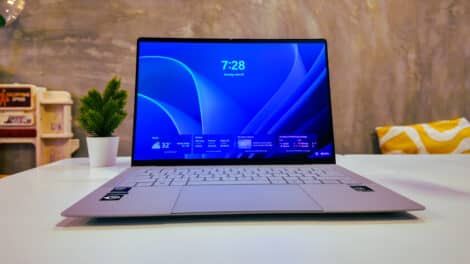
With shorter trips I don’t even want to bring a laptop anymore and just opt for a tablet, as the process of removing it from my bags can be a hassle due to size, and more importantly, I’ve had some almost slip out of my hands because the surface was slippery. I think many of these high-end laptops targeting prosumers and heavy users think that sleek metal designs are the best. They’re wrong. I think modern day executive laptops need to have some form of Nano Ceramic finish to make gripping it easier. The ASUS ExpertBook Ultra I pulled out of my Alpaka sling bag has this, and it feels great to hold.
The ASUS Nano Ceramic Technology 9H finish is like an extra layer of protection to the magnesium-aluminum alloy for the chassis. In practice, it makes gripping the Ultra quite easy, even if you have wet or oily hands from the stress of traveling. Unlike other laptops that have a flat underchassis with rubber support on each corner, the ExpertBook Ultra comes with a long rubber foot at the front and back of the device so that pulling and gripping it – and keeping it secure while walking through immigration (or your next meeting) is easy and less awkward. I checked the documentation and it seems that ASUS made use of 24 military-grade tests for durability to the point that you can hold the device from the edge of the Corning Gorilla matte screen, and bending it slightly won’t even matter.
Also, not that I have tried, but coffee and electronics often don’t go together. But as coffee fuels the executive class, keyboard spillage won’t be a problem. I even spoke to an ASUS executive who said that the best way to clean sticky coffee residue from the keyboard is to … run the keyboard under some fresh water!
Lastly, it seems like ASUS has designed this laptop to resemble a Business Jet Wing – lightweight, elegant, and efficient. It mirrors the lifestyle of the user and it is in these small things that make me appreciate the design choice. Oftentimes, being thin means some compromises to the I/O ports. Surprisingly, the ExpertBook Ultra comes with full I/O ports, allowing me versatility to use both USB-C and USB-A inputs (especially for the wireless mice). The box also comes with a HDMI out cable in case I want to present onto a larger screen.
I need to talk about a lovely convenience with trackpads. Admittedly, this is an area where not much innovation happens because we tend to take advantage of this. I was quite surprised that the ExpertBook Ultra’s touchpad could be tapped anywhere for input. Other laptops only allow you to depress towards the edge of the device, but this one lets you tap from anywhere. I found out that this is due to the 6-sensor haptic touchpad design with 1.5mm key travel. ASUS recognizes that everyone has a preference for using their touchpad and took this minor detail to heart.
The ExpertBook Ultra I’m using comes with a 3K 120Hz Tandem OLED Anti-glare Touchscreen with up to 1400 nits peak brightness. This means that while I was working from direct sunlight from my hotel room desk, the glare of the sun didn’t really affect my screen when facing away from the light. I’m currently using the Jet Fog version but there’s another colorway, Morn Grey, for those that want an elegant darker profile.
The luxury of not having to make decisions
What’s the best gift to give a person who is at a professional peak? I learned early on that the best gift to give someone who is constantly “always on” making decisions is the gift of not having to choose. When I was younger, I always had to make a choice between a sleek executive “style” laptop that I could toss into a sling bag, or a powerful desktop-replacement gaming laptop that weighed more than 3 kg. When you’re young, that weight doesn’t seem to matter, but as I get older, carrying a 3kg weight in your backpack alongside other personal effects can be quite taxing on the spine.
I’m now lucky to live at a time where a laptop that weighs less than 1kg and is 10.9mm thin has an integrated graphics card that’s more powerful than the top of the line video cards from the pandemic era. Out of the box, the 14” ExpertBook Ultra comes with the latest Intel Arc B390 graphics that can actually run demanding games like Cyberpunk 2077, Forza 5, and the latest Call of Duty: Black Ops 7 at 60-100fps. At the center of it all is the latest Core Ultra X9 series chip that balances power with battery efficiency. So here I am, finally able to not think about what laptop to bring because there really is just one laptop that can do everything: a light, powerful gaming-ready expert for work and entertainment. I’ll talk about AI in a minute, but it’s important to note that the Core Ultra X9 series comes with up to 50W CPU TDP due to the ASUS ExpertCool Technology, allowing faster compute power because of a better cooling system.
In my quick Singapore trip, I was able to survive the entire 48 hours without bringing a charger, with my battery capacity still at less than 30% for browsing and basic office tasks. And that’s with Spotify turned on. I make it a habit on my trips to always bring a small portable speaker for blasting ambient music in my hotel room at the end of a long day of meetings. On this trip, I didn’t need to do that as the 6-speaker Dolby Atmos system was able to deliver very balanced and full-sounding audio across my small hotel room. I really have to stress how cool it is that the engineers made the speakers fit into less than 1kg.
In that span of time I was also able to quickly download the latest Gemma 12B LLM on LM Studio because the Internet at the hotel supports the fastest Wi-Fi 7 protocol – which the ExpertBook Ultra has. Speaking of which, what about AI?
AI over the TOPS
I think what many executives tend to overlook when buying a PC is AI capability.
“But wait, Jayvee, don’t you just use Copilot+PC, Gemini, and Claude?”
Well yes. But that’s if you don’t mind training these LLM’s with your secret company data. In terms of security and AI, enterprises have a new need for running their AI models on-device. Meaning offline. One concrete example is that in my line of work I have a series of documents containing a long editorial style guide for my processes. If I fed that online, it would be used as a free-for-all tool that was otherwise proprietary information. So to keep it safe, I have fed it into a local on-device AI (ASUS has their own version but you can use apps like LM Studio) that is never uploaded to the Internet. I can use it to cross references other articles I wrote or edited to see if they abide by certain elements of style.
As someone who makes use of Gemini and Claude everyday, I only realized how spoiled we have become because a lot of the cloud-based AI agents we use are actually borrowing compute power from the cloud. It’s different when running it completely offline. Just to give you an idea, even newer laptops have a problem with running lighter versions of 2B or even 4B Gemma (the offline equivalent of Gemini) giving error messages when asking simple questions, like rewriting or editing blocks of text. So here’s the thing I discovered: out of the box, the ASUS ExpertBook Ultra already boasts 50 TOPS with its built-in NPU, but soars to 180 TOPS with the heavy lifting done by the Intel Arc integrated graphics. I’m able to install and run a Gemma 12B (billions of brain cells) model and run smoothly – this is the model that can think and produce creative work, very similar to the baseline version of Gemini that we normally use only. But in this case, it’s secure and completely offline.
I mentioned that ASUS also has their own built-in suite of on-device tools called MyExpert Suite to help with workflows like meeting transcriptions and document summaries. This is a free service – not a subscription – included in every ExpertBook device. As ASUS makes new waves into SMEs and enterprise clients, the ASUS Business Support Program is a dedicated commercial support for enterprise clients. If you’re a regular end-user, there are over 100+ ASUS service centers nationwide from Luzon, Visayas, to Mindanao. Also, all devices have a default 3-year warranty, extendable to up to 5 years.
ExpertLumi ambiance
As someone who has reviewed dozens of laptops since the early 2000’s there’s one design feature that the new ASUS ExpertBook Ultra has implemented that I truly love. My forgetful self sometimes does not know if I turned my laptop off, or it’s currently in sleep mode. Some laptops take forever to wake up from sleep and I accidentally turn it off while it’s waking up. The Ultra series has the ExpertLumi feature which is like a subtle ambient room light at hotels for finding your way around at night.
ExpertLumi has a similar purpose: once you flip open your laptop or press the power button, an ambient light illuminating the ExpertBook logo lights up, letting you know that the device is turned on. This is a great design feature because it’s the best visual cue for knowing if you’re waking up from sleep mode or the laptop is turned off.
ASUS ExpertBook Ultra, Flagship of the industry. Period.
So I’m writing this review on the ASUS ExpertBook Ultra while waiting for my flight back to Manila from Changi Airport. I’ve come to the realization that perhaps, I am finally the target audience of such a device. The role of the executive has taken new form in the past decade. Perhaps it is my Gen-X brain biases that project an image of the executive class behind a huge desk with carpeted flooring taking in meetings the entire day.
But time has definitely weathered that perception of what executives are. In the always-connected diaspora of modern technology, the executive is always on the go. I am always on the go. The executive is not a person of work-life balance, but work-life integration. I take my work and my entertainment with me, mostly on just one device. Am I part of the definition of a new executive class? The ASUS ExpertBook Ultra seems to think so.
Where to buy?
If you’re interested in upgrading into the executive class, you can check out the ASUS ExpertBook series in tech stores nationwide. Are you a business? Check out this page for bulk orders. ASUS takes their products seriously, which means that every unit comes with a default warranty of 3 years, upgradable to 5 years. This also includes warranty support for the battery, which is a huge deal.
View original source — Philippine Daily Inquirer ↗
Related stories

The Punch
NewsJul 1, 2026 · 1 min
No new insurgency group in Kebbi — Commissioner
The Punch
The Punch
NewsJul 1, 2026 · 1 min
DSS arrests ex-minister Uche Nnaji
The Punch

ESPN
SportsJul 1, 2026 · 1 min
Sources: Powell lands 2-yr., $45M deal with Bulls
ESPN
ESPN
SportsJul 1, 2026 · 1 min
Live NHL free agency tracker: Contract details for...
ESPN