Indian Express
Opera rolls out new Paste Protect feature to protect users against rising ClickFix-style attacks
4 min readNew DelhiJul 2, 2026 01:30 PM IST
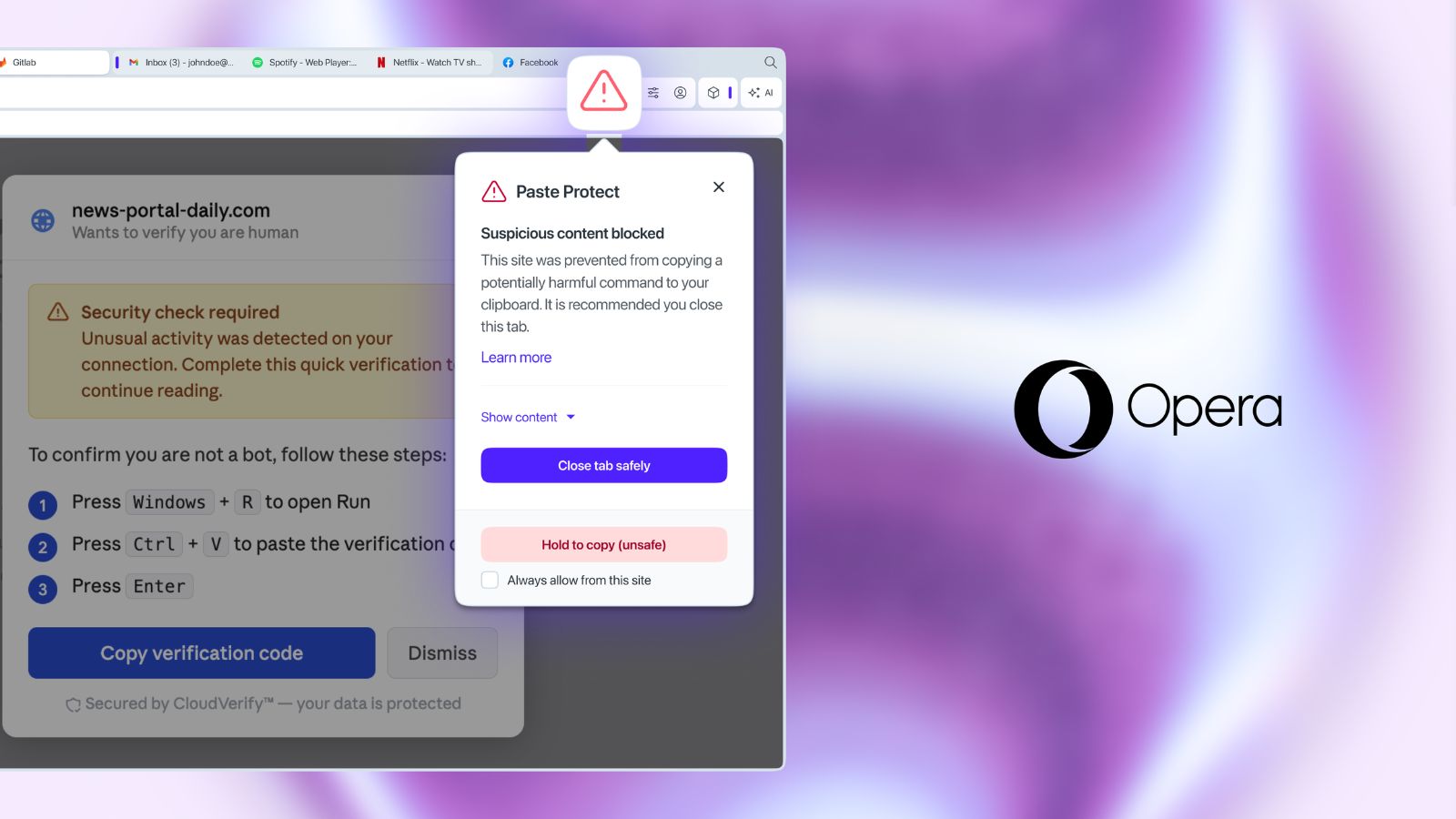
Paste Protect relies on advanced detection techniques to spot patterns associated with malicious scripts. (Image: Opera)
Opera on Thursday, July 2, launched a new in-browser feature that looks to protect users from clipboard-based cyber attacks such as hijacking and pastejacking.
Known as ‘Paste Protect’, the feature is built directly into Opera’s desktop browsers and switched on by default, so users are protected automatically with no setup required, according to the Norway-based browser maker. Paste Protect is specifically designed to protect users against ClickFix-based cyber attacks, which accounted for over half of malware-loading cyber attacks in 2025, as per Opera.
The natively integrated safeguard makes Opera one of the first browsers to roll out this feature. It comes at a time when artificial intelligence (AI) is widely expected to make cyber attacks easier to launch by lowering technical barriers. That potential risk is especially acute in browsers, with researchers warning that AI browser agents such as Perplexity’s Comet or ChatGPT Atlas are particularly vulnerable to indirect prompt injection attacks.
“ClickFix attacks succeed because they turn the user into a weapon. The clipboard is the last point before a malicious command is run, so that’s where we built our defense. With Paste Protect, we’re stopping these attacks at the exact moment they would normally succeed,” Pawel Kurzelewski, head of security at Opera, said in a statement.
“Opera had already been protecting users from paste hijacking for half a decade -it made sense to expand that protection to address one of the most increasingly serious online threats,” Mohamed Salah, senior director of product at Opera, said.
What is a ClickFix-style attack?
ClickFix-style attacks set out to target victims by showing them a video that won’t play or a CAPTCHA that does not verify them as a human. The first step is usually something small and ordinary, as per the company with more than 300 million monthly active users across its browser family.
The next step in the attack involves showing the potential victim a pop-up which claims to offer a fix to the previous issue. It instructs them to copy a short command and paste it into their computer’s terminal. Users are easily duped as it looks like routine troubleshooting.
Story continues below this ad
However, in reality, the command can be for installing malware on the user’s device, stealing saved passwords, or even enabling the threat actor to remotely access their device. “What makes ClickFix so effective is that it sidesteps most existing defences entirely. Antivirus software and email filters are built to catch threats arriving from outside, not commands a user types or pastes in themselves,” Opera said.
ClickFix-based cyber attacks account for over 53 per cent of this kind of malicious activity, according to cybersecurity firm Huntress.
How does Paste Protect help?
Opera’s new feature doubles as “a robust early warning system that can alert less experienced users while still enabling more control for more tech-savvy users or developers.”
Opera users are already protected by a Hijack protection feature designed to stop external applications from swapping out clipboard contents for something harmful without the user noticing. Paste Protects builds on this feature and comes with a unique Injection protection element which monitors clipboard activity in real time for potentially malicious commands that are copied by the user or placed there by a website.
Story continues below this ad
Paste Protect further relies on advanced detection techniques to spot patterns associated with malicious scripts. These techniques are tailored to devices running Windows, macOS, and Linux.
Upon detecting a threat, Paste Protect blocks any copy action and shows users a pop-up warning explaining what happened. It also appears as a red icon appears in the address bar. Users can see the first 120 characters of the blocked content. Only developers working with trusted sources can override the block or mark specific sites as safe.
View original source — Indian Express ↗
Related stories
TechRadar
TechnologyJul 2, 2026 · 1 min
Xbox might be following PlayStation's lead, as new reports claim Microsoft is testing a new disc-to-digital game…
TechRadar

TechRadar
TechnologyJul 2, 2026 · 1 min
I'm a NAS expert — here's how to build your own personal cloud for just over $1000
TechRadar

RFI
TechnologyJul 2, 2026 · 1 min
Google loses final appeal against EU’s record €4.1bn anti-trust fine
RFI

BBC
TechnologyJul 2, 2026 · 1 min
Google must pay €4.1bn fine for using Android to 'block' rivals
BBC