Uplift Parsons review: A dream standing desk that fits almost any workspace with elegance and ease
The Uplift Parsons is a compact standing desk that is as aesthetic as it is functional. It’s made from premium materials that make Uplift great, it’s got four thin, elegant legs rather than the standard blocky legs, it’s got a sleek edge, a beautiful desktop and more accessories than you know what to do with.
Pros
+Gorgeous real walnut top
+Premium feel and materials
+Stable four-legged design
+Smooth height change
+Integrated controller
+Great for any space
Cons
-Some monitor arms won’t be able to clamp on the side
-Same with other accessories like drawers; they won’t work
-Doesn’t go as high as I wished, but still high enough for 6’1”
Why you can trust TechRadar
We spend hours testing every product or service we review, so you can be sure you're buying the best. Find out more about how we test.
I've said it before, and I'll say it again: I have tested a vast number of desks. In fact, I would even be able to venture to say that I'm getting close to the arena of saying I've tested most of the key desks in the market.
Uplift has been stepping up their game big time. When I saw the Parsons and realized it came in a 48-inch-wide silhouette with those beautiful four legs and a sleek frame, I knew I needed to get my hands on it as soon as possible.
Personally, I was absolutely drawn to the sleek frame that wraps around the real walnut desktop. I chose a butcher-block walnut desktop, and I am absolutely in love with it. The material feels fantastic, and the quality is spectacular, and that's coming from somebody who has seen a lot of desks. I have seen a lot of what companies consider their premium desktops, and Uplift stands out among the best.
The soft-touch desk legs and the frame around the desk are also a beautiful touch. Also worth mentioning are the four individual legs. Some desks use four legs for stability, but they are really just the same style as the two-legged, blocky look that everybody knows by now. Uplift chose to use more spindle-type legs that retract into themselves, and they look absolutely stunning, even when on wheels, as I have them. They are still stable and still look just as great.
While this desk really only has one potential flaw, it's not even really a flaw. It's simply just something to know. I have found my way around it, and you can as well with just some simple planning on the forefront. Without further ado, we can get into the full review
Uplift Parsons Standing Desk: Price and Availability
The Uplift Parsons is available direct from Uplift's website, with prices starting at $829.
My desk configuration alone was about $2,000, including the desktop upgrade, the wheels, some power and lighting, and a few other accessories.
Are you a pro? Subscribe to our newsletter
Sign up to the TechRadar Pro newsletter to get all the top news, opinion, features and guidance your business needs to succeed!
I specifically chose to get the power inlay from Uplift so that it could mount seamlessly to the frame and not have to be bolted into the beautiful wood desktop. I also chose to get the wheels so that I can move this thing around a little bit more easily.
I chose to get the Bluetooth upgrade so that when I wanted to control my Bluetooth from my phone, or when Uplift decides to upgrade their app to be more integrated with my day-to-day technologies, then I could utilize this to its fullest.
The desk was roped in within just a matter of days and assembled quickly as well. I don't remember the exact time, but I believe it was just under 30 minutes, and then it took me several hours to set everything up on top just right. I've been tweaking ever since I built it, which was now, at this point, a hundred days ago or more.
Uplift Parsons Standing Desk: Unboxing and First Impressions
For most desks, I look at the sizing online, estimate the space I have and the features I want to showcase with this desk, and order that way. For this desk, I actually had a very specific spot I could fit it into, so unlike other desks, I measured more than I normally do to make sure it fits perfectly.
Thankfully, Uplift is very true to size, and their desk is exactly 48 inches wide, not 48 in a hair or just over, just under, but it is exactly 48 inches. When I measured and made room for a 48-inch-wide desk, this was spot on. The frame doesn't jut out past it, nor does the desk overlay the frame to add more width. The one thing that does extend a little bit past it is the wheels, but I can just have those swivel in and out instead of out and around when moving the desk.
Assembly was incredibly easy and straightforward, as all the Uplift desks are. I was even able to assemble it in the small room where I was going to have the desk, because assembly was so straightforward. I didn't need a ton of space to spread things out and make a mess. I could do it in a pretty tight space and assemble everything to get it up and running.
It was a quick little build session, and then I spent an absurd amount of time tweaking every little thing about the setup on top of the desk when it came to monitors, placement, docks, and the like.
Uplift Parsons Standing Desk: Design & Build Quality
Since I was going with such a small desk, I wanted to make sure that it was of the highest quality that I could find. That's where I'm thrilled that I was able to get my hands on the Parsons in such a short time. I chose the Walnut Butcher Block, and when I say that this is some of the most beautiful wood I've ever seen, I genuinely mean it. Some desk companies use MDF wrapped in laminate walnut or walnut pieces, but Uplift uses genuine materials and makes an absolutely beautiful desk that you can feel and tell the difference in right away.
This smoke-gray or light-black frame is also fantastic. Feels good in the hand and is made of quality materials. It's not a plasticky frame or something that you feel like is going to chip away, but it's metal parts that click together, forming a sturdy frame to support the weight of the desktop and everything you put on top.
One of the things that Uplift does really well is the allowed cutouts for grommets or power inlays at the top corners or the middle of the desk. For this desk, I chose to add one grommet hole in each back corner, allowing me to install a storage cup in one grommet and a power inlay in the other.
Another spot where Uplift has added some holes is the front plate of the frame to allow for an inlay control panel. This lays flat against the front face of the desk, and it is super clean. The buttons are easy to press. There are four presets, a height readout on the screen, and it's quite aesthetic. All Things considered.
Uplift Parsons Standing Desk: In use
I'll start with the two things I wish were different about this desk and get those out of the way.
First, the ledge of this desk, or more like the frame, will make it hard for some monitor arms to mount. Not all, just some. Depends entirely on how the clamp works and what that shape looks like. I was able to get two different models with it. Clearly this is not an all-or-nothing problem, but something worth noting if you already have the monitor arm picked out.
Second, I wish that this desk could go just a little bit higher. This is an edge case and truly not a need in any way, shape, or form, nor even a negative about the desk. If it could go just a little higher, I could slide my chair completely under the desk to make space in a small office.
This could also be solved by removing the headrest from my LiberNovo Omni Pro chair. Again, not a negative on the desk at all, just one very, very niche and specific wish.
Now to talk more about my use case with this desk. I have this as my main desk, which I use some on the weekend and then Monday through Wednesday at the church where I work. Currently, until we finish the renovations, my office is a multi-purpose room used for other things on the weekend as well. The space I had to fit into was unique and only 48 inches wide.
When I saw that the Parsons could fit a 48-inch desk, I was absolutely ecstatic! Even though I didn't have a ton of room to work with, I knew I would still need this desk to be highly functional because of the nature of what I do both at the church and outside.
This desk needed to be able to house:
Two large monitors
My laptop and iPad or two
Accessories like mouse and keyboard
Chargers
Power
Lighting
Plenty of ports which would require a docking station or two
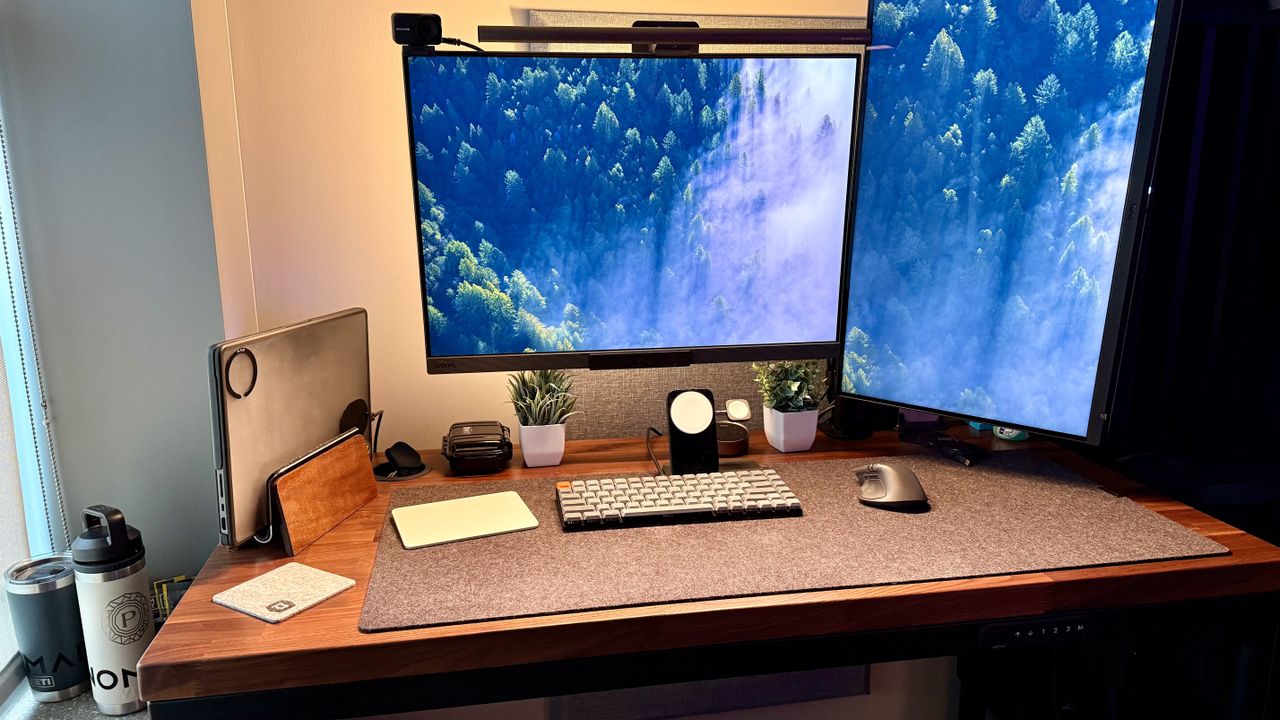
Lastly, I also wanted this to be a hot desk, so a single cable to run it all, with a mouse and keyboard that could switch between whatever was plugged in, which, of course, meant more ports. I chose a Keychron keyboard, the Logitech MX Master 4 mouse, and a Magic Trackpad for some niche scenarios. The keyboard is wired down to a dock that I actually mounted underneath the desk to save space, and so is the dongle for the MX Master 4 mouse. The Magic Trackpad is only used with my MacBook and is wireless over Bluetooth.
Along with those accessories, I have my BenQ RD280UG monitor in landscape on a monitor arm; then I have the brand-new (review coming soon) BenQ MA270UG in portrait off to the right of my main monitor. To the left, I have a Grovemade vertical stand for my MacBook, an air purifier from Uplift, and I still have room for a felt desk pad, and I don’t feel cramped at all.
One thing that helped, of course, was mounting so much underneath the desk and adding a BenQ light bar on top of the main monitor to avoid having another thing on the desk itself.
That's a lot of material on my desk and a lot more underneath my desk, and still the Parsons shines.
It looks clean and elegant. It's minimal. It works beautifully. There are absolutely zero issues in my well over a hundred days of testing this desk every single week, at least five to six days a week, with upwards of six to eight hours straight working at this desk, going up and down several times an hour.
If you're trying to build out an entire workspace, Uplift also has phenomenal shelves, organizers, storage, and other accessories and furniture you should check out. All made from the same incredibly high quality.
Uplift Parsons Standing Desk: Final verdict
After 100 days, this is still one of my favorite desks. It's clean, elegant, simple, and it doesn't make me feel bad for having a small desk in the slightest. Rather, it makes me feel great about optimizing such a small space to create something amazing, and all that is made possible by the stability and quality of the Uplift desk.
If it weren't for this quality, I wouldn't feel comfortable mounting the things I have. If it wasn't for the slimmest and cleanest design, I couldn't have put a desk where I did in the first place. Thanks to all of these things, this desk is so incredible.
If you're looking for a small or simply elegant desk to put in a non-traditional office, or you just care about your design, then you should check out the Uplift Parsons desk in all of its many shades of colors and materials. This desk is high quality. It's rather pricey, and it holds up to its reputation as a top-tier desk.
Image
1
of
15
For more office furniture, we've tested the best standing desks and the best office chairs.
Former TechRadar Pro B2B Hardware Editor, Collin has been in journalism for years, with experience in small and large markets, including Gearadical, DailyBeast, FutureNet, and more.
You must confirm your public display name before commenting
Please logout and then login again, you will then be prompted to enter your display name.
View original source — TechRadar ↗
Related stories

Mastercard partners govts to protect Africa’s cyberspace
Health insurance dies with you in technical loophole

Mark Zuckerberg tells staff that AI agents haven’t progressed as quickly as he’d hoped