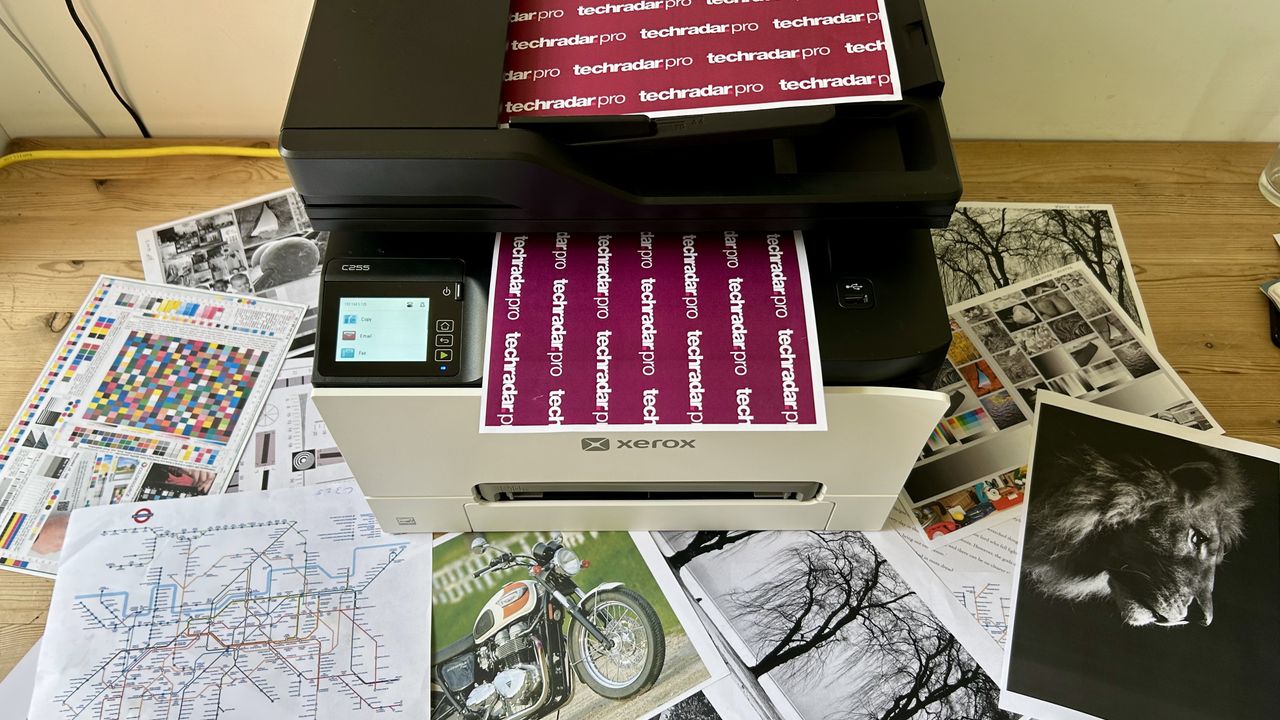
Xerox C255a review: I much prefer Xerox’s reboot of Lexmark’s laser printer
More than a rebrand. This compact multifunction office printer impressed me with rapid and reliable printing, some useful features and an improved user interface that makes it perfect for the SMB.
Pros
+Responsive and intuitive touchscreen
+Excellent black print quality
+Two paper inputs
+Front USB Host port
Cons
-Not much inbox toner
-Muted colors
-No two-sided scanning
-Photos look flat
Why you can trust TechRadar
We spend hours testing every product or service we review, so you can be sure you're buying the best. Find out more about how we test.
Jump To:
Design & build
Features & specifications
Setup
Performance
Consumables
Maintenance
Final verdict
Specs
Type: color multifunction laser printer
Functions: Print, scan, copy, fax, ADF
Connectivity: Ethernet, USB, Wi-Fi
Data storage slots: USB Host
Max print speed: 25ppm
Max paper size: Letter / A4
Print quality: 600x600 dpi (4,800 dpi color)
Memory: 1GB
Apple AirPrint: yes
Consumables included: 4 x toner cartridges (750 black, 500 color pages)
Dimensions: 16.18 x 15.71 x 13.58in (411 x 399 x 345 mm (WxDxH)
Weight: 42.9lbs/19.5kg
The first real fruit of the Xerox/Lexmark collaboration is a mid-priced multifunction laser printer aimed at hybrid workers and small businesses looking for high performance from a compact device that doesn’t need IT support.
It’s essentially Lexmark hardware with Xerox software and support, which sounds to me like the best of both worlds. The Lexmark print engine has proved fast and efficient in the past, but I much prefer the Xerox interface and Easy Assist App, so let’s see if this middle-of-the-road office all-in-one is worthy to wear the refreshed Xerox logo.
Xerox C255a: Design and build
The Xerox C255a is impressively compact for a four-in-one device with two paper inputs and a 50-sheet automatic document feeder (ADF). The main tray can hold up to 250 sheets of A4 or letter paper, while the slot-loading multipurpose tray is for single sheets or envelopes. It’s smaller than the Brother MFC-L8970CDW in all dimensions, which is good, but it’s a pity the display is less than half that printer’s size at just 2.8 inches. At least there’s a USB Host port beside the front panel, in addition to the USB data port at the rear.
Latest Videos From
It looks much like the Lexmark MC3326i on which this new model is based, except that it now has a playfully shaped plastic front panel that bends its top right corner outwards just enough to look like a furling sheet of paper, while offering an easy way to open up the toner compartment door. The black and gray livery looks smart and it’s showcasing the reworked Xerox logo, which now features a kind of crosshead screw icon that looks like a nod to Lexmark’s green square logo.
It’s reassuringly heavy at just under 20kg or 43lbs and it feels well made, from fifty percent recycled plastic. The toner cartridges lock into place with a satisfying click and the paper drawer opens smoothly. In short, build quality is a strong point. You can even add an optional swivel cabinet or adjustable stand, but sadly, you can’t add another paper cassette.
Xerox C255a: Features & specifications
As the company’s mid-priced model, the Xerox C255a has all the features on my check list to be among the best small business printers. Wi-Fi with AirPrint and Chromebook compatibility is built in, there’s a USB flash memory slot, strong security and a manual paper feed in addition to the main tray. It can auto duplex print, of course, but it can’t auto duplex scan. That feature is reserved for the step-up Xerox C325.
The print rate is also appreciably slower than the Xerox C325. That said, our Xerox C255a is no slouch at 26ppm (pages per minute) in simplex mode and it doesn’t slow down much when duplexing. I think it’s fast enough for the needs of most businesses.
Are you a pro? Subscribe to our newsletter
Sign up to the TechRadar Pro newsletter to get all the top news, opinion, features and guidance your business needs to succeed!
Print resolution is the usual 600x600 DPI which matches the scan resolution, while color printing is enhanced to 4,800 DPI. The 1GHz processor and 1GB of RAM is an improvement on the old Lexmark and Xerox’s recommended duty cycle of up to 50,000 pages per month suggests that this is a printer that can handle a very heavy workload.
Xerox C255a: Setup and operation
I found the setup procedure to be quick and painless and did not need to reach for the single-page quick start guide. You just have to remove all the transport packaging, load your paper, power up and follow the on-screen prompts to get online and print the first test page.
The inbuilt 2.8-inch display is rather small, but it’s intuitive and Xerox’s setup procedure makes it easy to link your smartphone so you can use the helpful Easy Assist companion app to get your printer onto your Wi-Fi network for the first time.
Day-to-day operation is simplified by the user-friendly OS which I think Xerox always did better than Lexmark. The Lexmark MC3326i always suffered from a lazy touchscreen and more convoluted menu system, which I’m happy to say has been much improved.
Xerox C255a: Performance
Firstly, the pages of crisp dark text on plain paper pumped out by the Xerox C255a look great and explain why Xerox was so keen to purchase Lexmark’s print engine. It’s not the quietest laser printer in its class, nor the fastest, but the black on white print quality is consistently excellent. Characters printed at small point sizes always appear legible and well delineated when viewed through a magnifying glass.
Mixed color documents are less impressive because the C/M/Y toner, which doesn’t appear to have changed since the Lexmark days, is somewhat dull. The color tones are actually quite natural and consistent, but they certainly don’t pop in the way that they do with the HP Color LaserJet Pro 4201dw, for example. I don’t think this is a problem for printing handouts and reports etc, but photographs, even when printed on laser photo paper, tend to look flat and disappointing.
The scanner bed and ADF both worked flawlessly during the tests and made accurate multipage copies swiftly and without paper jams. The duplicates appeared noticeably paler than the originals, but not enough to be a problem. As a digital copier, the Xerox C255a is fine, but without single-pass dual scanning, that’s not its strongest suit.
Xerox C255a: Consumables
The Xerox C255a ships with four pre-loaded starter cartridges containing just enough toner to print 750 black and pages, or 500 in color. That means they’re less than a third full because Xerox’s standard carts yield 1,200 color and 1,300 black pages, while the high-capacity carts yield up to 2500 color and 3,000 black pages.
With the highest yield black Xerox cartridges costing around US$100 or £98, the cost per page can be reasonably competitive, although it’s by no means the lowest running cost among laser printers in this class.
Apart from the badge, the cartridges look identical to those of the Lexmark MC33261i and contain the same toner, so we can assume they’re compatible.
Xerox C255a: Maintenance
Apart from replacing the toner cartridges, the Xerox C255a may require a new waste toner cartridge costing around $20 when the original becomes full.
The imaging drums are not built into the toner cartridges in this case, so they will also need to be swapped out if you notice serious deterioration in print quality or you receive the dreaded ‘Replace Drum’ message on the display.
None of those things should happen before around 40,000 prints, so I’d say this is a low-maintenance device.
Xerox C255a: Final verdict
Image
1
of
5
The Xerox C255a performed well enough in all of my tests to recommend it to both home workers with high print demands and small businesses in a shared office. It’s compact enough to sit on your desk at home, while also having the print speed and paper/ink capacity to serve a small workgroup, and thanks to the intuitive touchscreen interface and strong app support, you’re unlikely to need IT backup.
It’s not the quietest of laser printers, nor the fastest and it lacks high-end features like NFC or single-pass dual scanning, but crucially, it does have all the essentials, such as Wi-Fi with AirPrint, an ADF and robust security. There’s not much toner in the starter cartridges, but Xerox’s high-yield refills are reasonably priced. Build quality is also reassuringly solid and having tested the Lexmark on which this Xerox is based, I can confirm that it’s a genuine improvement rather than just a rebrand.
For more top-rated options, I've tested out the best home printers and the best laser printers.
Senior Editor, Printers
Jim has been evaluating printers for more than twenty years and has, to date, written over a hundred reviews for TechRadar Pro. From pocket printers to industrial dye sublimation, Jim has been there, run the tests and printed the t-shirt. His expertise extends to consumables (paper, ink, toner) and his printer buying guides make it easy to compare these essential peripherals.
You must confirm your public display name before commenting
Please logout and then login again, you will then be prompted to enter your display name.
View original source — TechRadar ↗
Related stories

Crypto ventures, Indian luxury real estate: How Donald Trump earned over $1 billion in 2025
I was surprised by how well Keychron’s new mouse performed — but one aspect might disappoint FPS players

Defence body clears proposals to acquire ‘Akash Tarang’, MRSAM, VSHORADS, jet-based Kamikaze drones for Armed Forces
