Unihertz Titan 2 Elite review: This 5G business phone with a BlackBerry-style keyboard made my mobile work feel faster
There’s a reason we have all switched to touchscreen smartphones: ease of use and simplicity. However, there is still a subset of people who love physical-keyboard mobile phones, and the Titan Elite 2 is a prime option. This brightly coloured, compact Android smartphone features a physical QWERTY keyboard, and whilst it might seem like something from the 90s, once you get used to having physical keys rather than just a simple touchscreen, it starts to make a lot of sense. With the ability to add shortcuts for repetitive tasks, this is an exceptionally fast smartphone option once you find your way around. In use, the screen is bright and touchscreen-enabled, and once you get used to the keys, it’s actually an extremely fast way to type, giving a slightly analogue, retro feel. If you prefer physical keyboards to touchscreens, this is a great option, and I also love the compact size.
Pros
+Real keyboard
+Compact size
+Plenty of storage expansion
Cons
-Small display area
-No headphone jack
-No wireless charging
Why you can trust TechRadar
We spend hours testing every product or service we review, so you can be sure you're buying the best. Find out more about how we test.
Titan 2 Elite: 30-second review
Touchscreens have changed the way we enter text on our mobile devices, with swipes used to interact with apps rather than typing on a traditional keyboard; long gone are the days of BlackBerry.
This means that the way apps are designed has changed greatly since the advent of smartphones. However, there is still a place for physical QWERTY keyboards, especially if you do a lot of typing. Whilst a touchscreen is great for straightforward input, when it comes to shortcuts, they can be a little bit convoluted, and that’s where this type of QWERTY keyboard really starts to make sense, especially when you can customise and add your own shortcut systems into the keyboard layout.
As a smartphone, the Titan Elite 2 runs Android 16, into which you install the latest apps, and the screen itself, while small at 4.03 inches, is an AMOLED display with 1080 x 1200 resolution and a very decent 120Hz refresh rate. This means it is actually pretty good for watching back TV shows or catching up on social media, but it really comes into its own for quickly typing in messages. Actually, after I got used to the small keys, I found it much easier to respond to messages, WhatsApp, and emails on this keyboard than on the standard touchscreen.
Through the test, I found the battery life was pretty decent, and because you are generally not using it the same way you would, say, a standard touchscreen smartphone, the battery still had a decent 60% remaining when I got back home. I then just found myself using the phone less because of the design, and again, that was something that really endeared me to the design.
The other point about the design, aside from the bright orange colour, is just how small and compact it is. It fits neatly into a trouser pocket, and while it’s as wide as a smartphone, it’s shorter, making it feel slim and lightweight.
Whilst there were many aspects of this phone that I really liked, there were a few minor issues. When it came to quickly editing a photo or two, the small screen was just a little bit too small. There’s not a great deal of real estate for anything other than typing or watching back videos, and even when you come to play games, because the screen is that much smaller and with that keyboard in place, it’s not great. Then there is the issue that there is no 3.5mm jack or wireless charging, which is a little bit of a shame. However, it does feature Bluetooth and the USB-C port.
The Unihertz Titan 2 Elite is a really nicely considered phone. It won’t appeal to everyone, but for those who like the slightly retro approach to smartphone use, it is a great option.
Sign up to the TechRadar Pro newsletter to get all the top news, opinion, features and guidance your business needs to succeed!
Titan 2 Elite: Price and availability
How much does it cost? $489
When is it out? Now
Where can you get it? Online at unihertz.com
At present, the phone is only available for pre-order, with a full release in August. The US price is at present set at $489.99.
You can pre-order now by clicking here, and the item will start shipping soon.
Value: 4/5
Titan 2 Elite: Specs
CPU: MediaTek Dimensity 7400, octa-core, 2.0–2.6GHz
Graphics: Mali-G615 MC2
RAM: 12GB LPDDR5
Storage: 256GB UFS 3.1, microSD support up to 2TB via hybrid slot
Ports: USB-C
Connectivity: 5G, 4G LTE, dual Nano SIM, eSIM, Wi-Fi 6, Bluetooth 6.0, NFC, GPS/GLONASS/BeiDou/Galileo, IR blaster
Audio: Loudspeaker, FM radio, no 3.5mm headphone jack
Camera: 50MP main + 50MP telephoto rear cameras; 32MP front camera
Size: 117.8 × 75 × 10.4mm; 163g
OS Installed: Android 16
Titan 2 Elite: Design
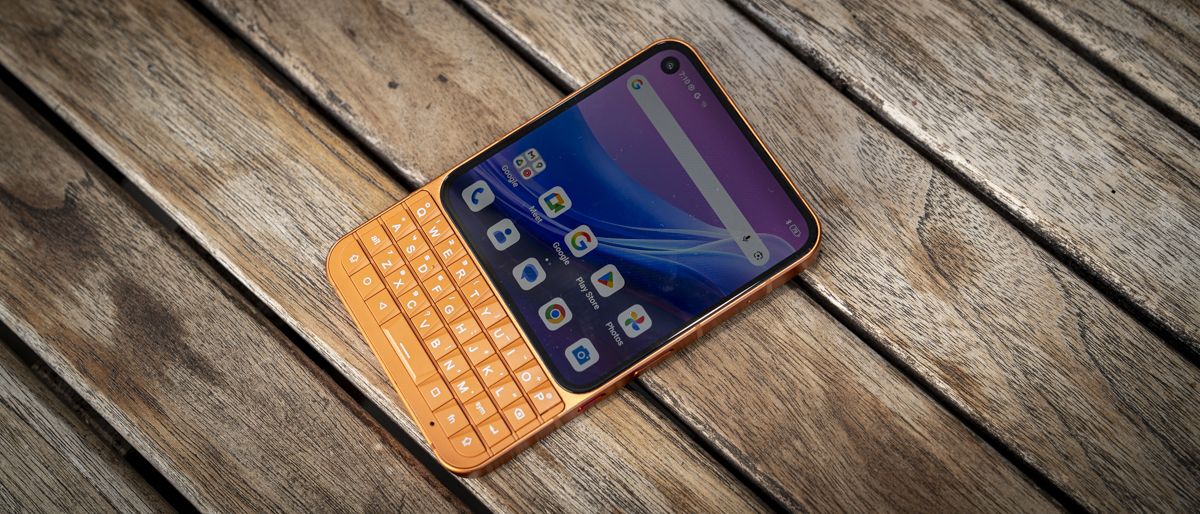
The Unihertz Titan 2 Elite instantly differentiates itself from most smartphones, first with its colour options, my review sample was the bright orange, though it’s also available in a subdued black. Then more strikingly, with its physical QWERTY keyboard below the touch screen.
The phone itself is compact, measuring 117.8 x 75 x 10.4mm and weighing just 163g, significantly lighter than the latest intake of smartphones. Whilst that screen is smaller, as the review went on, I found that having a physical keyboard always there, partnered with an on-screen keyboard for special characters, actually made it a quick way to input text and write emails, something I always find extremely tricky on my iPhone.
The phone's build quality is also surprisingly good. Made of aerospace-grade CNC aluminium and with that anodised finish, it gives a good, high-quality premium feel.
The keyboard is well designed, with a slight bevel on each key. They just make it a little easier to find each key than if they were flat. It does take a little bit of time to convert from using a touchscreen mobile to one with a physical keyboard, and there is no doubt that those keys are really small. But even with my hands, I was able to adapt to those keys relatively easily, and I did find typing just a little bit easier. I was far less likely to mistype on this phone than I am when using the touchscreen keyboard on the iPhone.
The screen is smaller and has a slightly different aspect ratio than I am used to, and at 4.03 inches, it features an AMOLED display that is nice, bright, and easy to view in most conditions. It also has a decent resolution of 1080 x 1200 and a refresh rate of 120Hz, so whilst it is not really designed for a bit of gaming, if you do decide to opt for a few moments playing Asphalt Legends, the gameplay is actually relatively smooth.
That screen size can leave things feeling a little cramped at times, but it is quite nice to have a square screen. What really strikes you about the phone in your hand is just how comfortable it is to use. It looks a little bit wider than the standard smartphone when you take it out of your pocket, but it’s actually much the same.
It’s just the height that is much reduced, meaning that, firstly, it’s more comfortable in a pocket, and, secondly, when you have it to your ear, it’s in a really nice position for the earpiece and the microphone. I just found it much nicer to handle than my larger phone.
Design-wise, this looks like a business phone, and there is no getting around it. It also looks very retro with a modern twist. I love the bright orange color, and I really like the look of the QWERTY keyboard. It’s supported by the touchscreen, and as designs go, it all seems well balanced. Of course, like all decent smartphones these days, there is also a selection of cameras on the back and a very decent forward-facing selfie camera for conferencing.
Design: 4.5 / 5
Titan 2 Elite: Features
There is no escaping the main feature here, which is that physical QWERTY keyboard with touch-sensitive functions, both on the screen and the keyboard itself, which is quite remarkable when you start to scroll through pages, especially online, and you can do that by just swiping up and down on the keyboard itself and not the touchscreen.
This function is not available from the outset. You need to delve into the settings to activate it, but once you have, the scroll assistant and cursor assistant open up a wealth of controls I have not seen on a smartphone of this style before. It just becomes quick and intuitive to use.
Then, as you delve into the settings and you go to shortcut keys, you then have a series of function keys that you can also assign, so if you want a quick key to open up one of your apps or to copy and paste, then you can do all of that through the shortcut key menu. This is something that I always find especially tricky on a touchscreen-only device.
The point about the keyboard is that it is a decent-quality, and once you figure out that you need to push the “symb” button in order to bring up symbols and numerics, everything from that point on becomes pretty much smooth sailing.
Inside, there’s a relatively decent MediaTek Dimensity 7400 chipset, 12GB of LPDDR5 RAM and 256GB of UFS 3.1 storage. As you use the phone for various apps, you realise it is more than capable of work-related tasks, including the full Google suite, where it seems especially tuned and smooth in use.
What I also like is that there is dual Nano SIM support, eSIM support, and a hybrid microSD expansion option, so you can have one Nano SIM alongside a microSD for storage expansion.
The CPU is joined by a decent GPU, the Mali-G615 MC2, which we often see in this style of mid-range smartphone. During the test, I found that this was more than enough for most productivity apps in the Google suite and handled Lightroom and gaming without too many issues, although the screen size was the main limitation. So, for the intended use, if you are mainly typing, then this GPU is probably going to keep up with everything that you need.
The cameras are not cutting-edge, but they are well-balanced, with a 50-megapixel main camera and a 50-megapixel telephoto camera, which should just about cover you in most situations. They are great for site pics and taking a few snaps, but they are not cutting-edge camera quality. Likewise, the 32-megapixel selfie camera is perfect for video conferencing and video calls, and for capturing a quick picture of yourself in front of a few locations, but the quality is mediocre rather than outstanding.
What I do like is that it has the latest version of Android 16, and Unihertz has said that this will come with five years of update support and OS upgrades to Android 20, along with all security patches until 2031, meaning that your investment in this phone will be supported for a good few years.
The other point here is that whilst it might lack a 3.5mm headphone jack, which I would have liked to have seen on something slightly retro-styled like this, there is NFC, an IR blaster, fingerprint unlock, USB OTG, FM radio, Google Pay support and a programmable red side button that you can assign to something such as the camera.
Features: 4.5 / 5
Titan 2 Elite: Performance
Test Scores
Geekbench CPU Multi: 3292
Geekbench CPU Single: 1061
Geekbench GPU: 3038
Wild Life Overall: 3971
Sling Shot: 7709
The design of this phone is quite striking, and actually, whilst it has a decent CPU, when it comes to the main focus of this smartphone, it’s all about productivity and being able to type quickly, with the big feature being that full QWERTY keyboard.
An initial look at the phone as it’s lifted from the box shows it is exceptionally high quality. That CNC-machined aluminium just gives it a real nice finish, and with that anodised orange coating, it just looks great. It’s kind of in the same colour profile as the new iPhone 17 Pro, but if you are not into these bright, vivid colours, you will be glad to know you can also order a black version, which is a lot more sedate.
Getting started with the phone was quick and easy enough, and after a full charge, I loaded the interface, signed in to Google, and instantly, all my Google apps and everything else were available. It just shows how the Dimensity 7400, 12GB of RAM and the ultra-fast UFS 3.1 storage could be when used on a phone that’s primarily designed for productivity rather than multimedia, and for messaging, browsing, email, as well as updating a couple of Google Docs, it was able to handle everything without too many issues.
The one thing that I did note from the outset was the size of the screen. There is no getting away from the fact that it is a lot smaller than your average smartphone. However using Google Docs, because you have the keyboard underneath rather than covering half of the screen being taken up by a keyboard, it feels perfectly workable despite being smaller.
As I got into using the keyboard and my thumbs started to get the muscle memory for the positioning of all the keys, I found my typing speed actually increased, or at least the number of mistakes I was making rapidly reduced. When smartphones first arrived, I used a BlackBerry for a long time, and there is still a bit of that muscle memory left, which helps me navigate this phone relatively quickly.
Obviously, with technological advancement, it’s much better than those older phones, and what I like most is that the keys are not only physical but also touch-sensitive. By activating the cursor and scroll controls in the settings, I could then use my finger to swipe left or right on the keyboard or navigate on the screen with the small cursor.
This ability to essentially use the keyboard as a trackpad just made typing and correcting what I was typing on screen so much easier than on my iPhone, which when trying to place the cursor on the iPhone will inevitably pick a spot two lines below what I want.
Trying to navigate anywhere on my iPhone screen with the cursor is near impossible, to the point where I rarely bother, often just deleting a line or two in order to correct something. Here, with the Android 16 interface within Google Docs, it just worked. It was easy to place the cursor where I wanted, then correct the text and move on without getting frustrated.
During the test period with the phone, its limitations became obvious, and if you do decide to download Lightroom, for instance, to update and edit some photos, the small screen size really starts to feel like a limitation, although the interface is incredibly well designed for small screen phones.
It’s still possible to work on an image, but your eyesight has to be pretty good, and it is obviously not designed for this sort of thing. Likewise, playing games just gets you a small screen rather than the large screens that we are used to with the latest smartphones.
However, when it came to viewing video, and this might be because I was used to an old iPod video years ago, I actually quite enjoyed watching a couple of episodes of a TV show on the small screen. Whilst yes, it is considerably smaller than the iPhone's, the screen and picture quality are still pretty good.
Through the test, I utilised the phone in and out of the office and also on a trip up to London. Because I was so impressed by its use, I used it as my main phone for about a week to see if I could really get on with a keyboard smartphone rather than a touchscreen option, and over time if that keyboard was a touch larger then yes I might have actually made the switch.
One of the things this highlighted through the use was battery life, which lasted a full day without issue, even with making a few calls, answering emails, updating Word docs, and listening to music. I wouldn’t say that the battery life is outstanding at the end of the day. It did need a good charge, but for a phone of this size, it’s certainly more than enough for a day-to-day phone that will always be charged at night.
To finish the test, I took a quick look at the camera, and there are two options. You have your wide-angle to capture large vistas and your telephoto, which lets you zoom in and, as I found, is also pretty good for portraits. Whilst the camera is not a major feature of the phone, the fact that both are set at 50 megapixels means that they are well balanced.
Whilst the cameras are not headline features, they can still capture a pretty decent image as long as the lighting conditions are right and you are not expecting too much. If you are just taking holiday snaps, or, more than likely, a few images on business trips, then this will be perfectly adequate for what you need.
Performance: 4 / 5
Titan 2 Elite: Final verdict
There is no doubt that the Titan 2 Elite is a niche phone with that QWERTY keyboard, and it’s not trying to take on touchscreen smartphones. It’s more of an alternative to use, and it also changes how you use your smartphone because you have a physical way to interact with it, rather than that touchscreen swipe.
Through the test, I found that it’s much better suited to typing, so it’s good for writing emails, replying to social media messages, and standard messages. I found it a lot easier on this phone than on my iPhone, mainly because I am always mis-typing on that touchscreen, whereas here each press, because of that small bevel on the keys, was a little more precise despite the keys’ small size, which was surprising.
I also like that the keyboard, which features a decent backlight, could be set to be touch-sensitive, essentially using it as a trackpad or for left- and right-scroll, which again just made things easier. The fact that you can also assign some of the buttons to custom settings and applications really does help with workflow, especially if you do a lot of typing on your phone.
When it came to battery life, it was well-balanced and able to handle all of Google’s productivity apps without issue and lasted easily all day. For me, at least, I found that the touchscreen and keyboard combo was a really great way of working. I also love the retro look of the phone. It is kind of a mix of retro and modern, but I do miss a 3.5mm headphone jack. It would just have set it off nicely.
So whilst this phone is not really a competitor to the latest touchscreen mobiles, it does offer something different, and if you like the more physical way of interacting with your phone and you want something that is just a little bit smaller and lighter than what is on offer in the mainstream, then the Unihertz Titan 2 Elite is a great alternative, with a design focused on productivity rather than social, gaming and creative use.
Should I buy the Titan 2 Elite?
Swipe to scroll horizontally
Value
Keyboard smartphone with unique features with mid-range performance
3.5/5
Design
The compact design is distinctive, and with a physical keyboard, it gives a different slant on smartphones
4/5
Features
The keyboard is the main feature, but the fact that it is touchscreen and has a more square-style screen means there are plenty of features that help promote productivity
4/5
Performance
Mid-range performance from the CPU and GPU, but that is more than enough for its intended use for productivity
4/5
Overall
A retro take on the modern smartphone that works and gives you an alternative to the standard touchscreen approach
4/5
Buy it if...
Don't buy it if...
For more professional picks, we've tested the best rugged phones for field-work.
Alastair is a photographer, filmmaker and tech writer who has been working in the publishing industry since the late 1990s. For more than 25 years he has covered photography, video and technology across Future's photography, technology and gaming brands. He runs a photography and video production company and lectures in TV and film. He can usually be found testing mini PCs or prototyping and prop building with the aid of 3D printing.
View original source — TechRadar ↗
Related stories

Female US rower completes historic solo journey from California to Hawaii

Several ships make sharp U-turn, not passing through Strait of Hormuz — TV channel