TechRadar
Toshiba N300 4TB NAS HDD review: Can the extra cost over its rivals be justified by its performance?
I’m torn. The speed of the N300 would be a major benefit during a pack rebuild, but it increases the price of this storage by 50%. If you have a NAS with more than four bays, then this could be a costly choice without a significant advantage.
Pros
+7200 RPM
+512MB cache
+Capacities up to 22TB
Cons
-More expensive than the IronWolf Pro
-Noisy
-Uses more power
Why you can trust TechRadar
We spend hours testing every product or service we review, so you can be sure you're buying the best. Find out more about how we test.
While there are a few other brands, the hard drive market is essentially a three-horse race between WD, Seagate and Toshiba.
Having looked at WD and Seagate NAS HDDs recently, it seemed appropriate to look at what Toshiba offers that’s different to the other two.
Toshiba Electronics Europe launched the N300 NAS drive series in January 2017. By that point, Western Digital and Seagate had been in the dedicated NAS drive market for years. WD Red has been on sale since 2012, and Seagate IronWolf launched in 2016. Toshiba was late to this party, and that certainly coloured its product range from the outset.
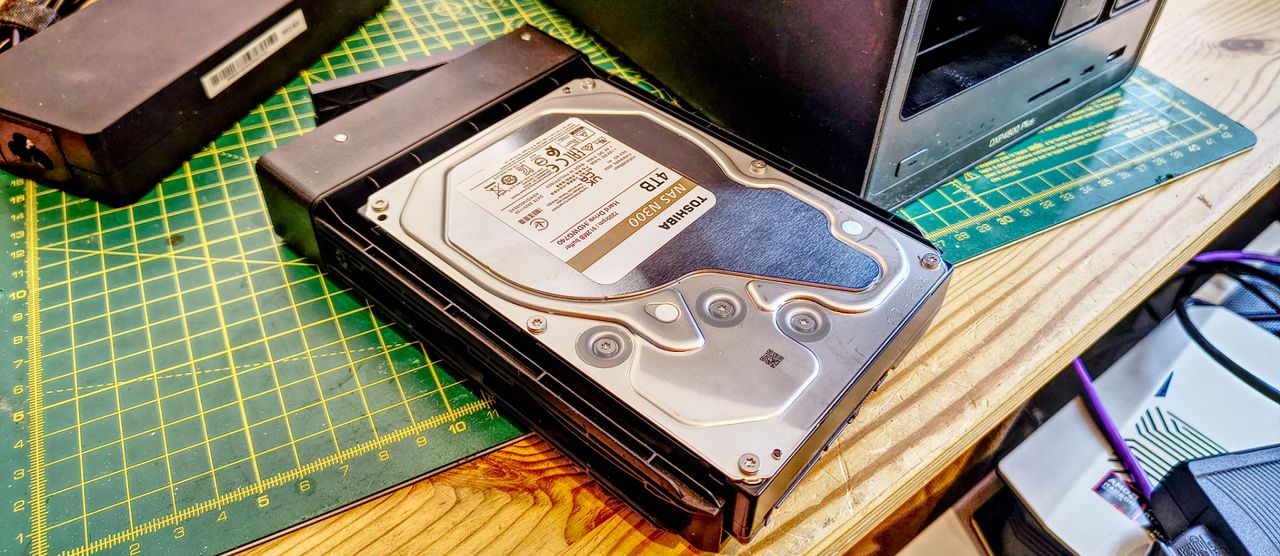
The N300 launched at 4TB, 6TB, and 8TB, all carrying a 128MB data buffer and a 7200 RPM spindle. That last detail is the key one. Toshiba did not try to match WD and Seagate on their terms; instead, it went faster.
The N300 range runs at 7200 RPM on every capacity variant, from the smallest to the largest. That decision produces a drive with meaningfully higher sequential throughput. The N300 achieves up to 298 MB/s sustained transfer speed. The WD Red Plus manages around 180-190 MB/s. The IronWolf reaches 202 MB/s. The N300 leaves both behind in raw sequential performance.
And, this newer HDWG740EZSTC model covered here offers 512MB of cache, where older revisions had 128MB or 256MB.
However, there are tradeoffs here. On the hardware side, the additional rotational speed makes the N300 noisier, it generates more heat, and uses more power. That makes it less suitable for a NAS that’s sitting on the desktop, and more acceptable if you have a server room. And, the other awkward aspect of the N300 is that Toshiba has jacked the price up of this drive to around 50% more than what WD and Seagate are asking for the same capacity from some sources.
Sign up to the TechRadar Pro newsletter to get all the top news, opinion, features and guidance your business needs to succeed!
There are a few deals to be had on the N300, but it does make you wonder whether it's competing with the WD Red Plus and Seagate IronWolf, or the Red Pro and IronWolf Pro?
If only Toshiba would price the N300 more appropriately, it might become one of the best NAS drive options.
Without doubt, the worst possible place to buy the N300 4TB drive is from Amazon.com and the Toshiba Store on that retailer.
The current asking price there is around $330, which is utterly outrageous. To put that into perspective, in January 2026, the price was $215.62, and in August 2025, it was $154.99. Therefore, it has seen a 212% price increase in just nine months. Given that I wouldn’t believe there is much interest in 4TB drives for Datacentres, this is purely corporate greed in action.
But what’s even more curious is that even in the US, you can get this drive for cheaper, since B&H Photo sells it for $244.99, and Newegg wants $299.
Outside of the US borders, the prices are still elevated but not as excessively. From Amazon.co.uk, the 4TB capacity is priced around the £200 mark, and across Europe on Amazon, it's €237.86, if they have stock.
For comparison, American customers on Amazon.com can pay $194.99 for the 4TB WD Plus drive, and the 4TB Seagate IronWolf is only $189.
In short, wherever you buy the N300, it's seen a much larger price increase than its competitors, and this is true across all regions.
One important difference to note is that the N300 is available in a much larger range of sizes than Red Plus and IronWolf. The smallest N300 is 4TB, and it is available in 6TB, 8TB, 10TB, 12TB, 14TB, 16TB, 17TB, 20TB and 22TB.
The Red Plus only goes from 1TB up to 12TB, and the IronWolf goes from 1TB to 16TB, with some truly odd sizes such as 7TB in between the usual capacity increases.
However, you look at the N300 pricing, this is an expensive drive that tries to go between the Red Plus/IronWolf and the Red Pro/IronWolf Pro product ranges.
What makes this more complicated is that while officially IronWolf Pro drives are made in 4TB capacities, I could only find 12TB and larger. But the 4TB WD Red Pro can be found for $249.99 on Amazon, which is cheaper than the N300 for the same capacity.
What’s genuinely confusing about the N300 range is that if you go looking for drives of a particular capacity, you might find that drive with three different part numbers, one being the retail number, others being OEM, and I managed with some sizes to find ones with 128MB, 512MB and 1024MB caches. Obviously, the larger caches are better, especially on bigger capacity drives.
As an example of how messed up Toshiba is on Amazon.com, clicking “Visit the Toshiba Store” sometimes takes you to Toshiba kitchen products.
These prices need to be more consistent and gouge less.
Toshiba N300 4TB: Design
Since its launch, Toshiba has developed several proprietary technologies for the N300 and has kept them consistent across the product line.
These include Stable Platter Technology, which uses a tied spindle motor to secure the drive shaft at both ends. This reduces system-induced vibration and is directly comparable with WD's 3D Active Balance Plus approach. Both address the same problem, where in a multi-drive enclosure, vibration from one drive affects the others.
Also special to the N300 is Dynamic Cache Technology, a self-contained algorithm with on-board buffer management that optimises cache allocation between read and write operations in real time. From the outset, the N300 has typically had more cache than its competition, so managing the use of that is important for performance.
One of the hidden issues with faster-rotating drives is wear, and on the N300, this is addressed in a few interesting ways, one being Ramp Load Technology. This parks the read and write heads on a ramp outside the platter surface when the drive is idle. It reduces head wear during power cycles and protects the media surface.
Error recovery control has also been present since the original launch, limiting recovery time to avoid RAID array ejections in the same way that WD's TLER does.
All these features I’ve mentioned arrived with the first N300 drives, but since then, the N300 has undergone some subtle changes, one of which is the introduction of NASLink Technology.
This fine-tunes drive behaviour for rapid data access and includes firmware-level optimisation for RAID performance through improved disk coordination. The more drives you have in an array, the more important it is that they’re all moving to a common beat, and Toshiba has baked that into the N300 via firmware updates.
Having larger arrays improves performance, but it introduces vibrations that can migrate from one drive to those either side of it. To combat this, the N300 also carries three built-in rotational vibration sensors. These detect and compensate for the knock-on vibration effects that become a serious problem once a NAS enclosure has more than four drives installed.
Overall, while Toshiba hasn’t come up with anything like Seagate IronWolf Health Management. In other respects, this is probably the most sophisticated drive serving the home and small-business NAS market.
However, when Toshiba only offers a three-year warranty and 180TB/year workload, it doesn't seem much like it's that special.
Toshiba N300 4TB: Performance
Since Toshiba only provided two of these drives, there seemed little point in trying to work out what array advantages running the N300 offered. Therefore, I went with the same PC analysis that I used on the WD Red Plus and IronWolf drives
Here are my results:
Swipe to scroll horizontally
Drives
Toshiba N300
WD Red Plus
IronWolf
Part No.
HDWG740
WD40EFPX
ST4000VN006
Capacity
4TB
4TB
4TB
Cache
512MB
256MB
256MB
Rotational Speed
RPM
7200
5400
5400
AJA
Read
MB/s
282
187
190
Write
MB/s
283
179
185
ATTO
Read
MB/s
291.57
206.24
192.35
Write
MB/s
294.25
197.35
191.76
CrystalDiskMark Default
Read
MB/s
299.18
201.23
200.77
Write
MB/s
300.50
208.26
199.33
CrystalDiskMark RealWorld
Read
MB/s
286.95
212.46
200.22
Write
MB/s
290.01
204.42
199.11
PCMark
Score
651
801
677
Bandwidth
MB/s
99.87
124.49
103.69
MS Winsat
Random 16 Read
MB/s
2.37
1.71
1.6
Sequential 64.0 Read
MB/s
218.38
168.53
158.16
Sequential 64.0 Write
MB/s
289.31
204.65
190.5
Read Time with Sequential Writes
ms
4.810
1.385
1.946
Latency: 95th Percentile
ms
31.620
12.685
34.685
Latency: Maximum
ms
75.357
64.723
62.341
Average Read Time with Random Writes
ms
12.021
5.267
9.898
Aside from PCMark10, all other tests show that the N300 is a country mile faster than either of the alternative NAS drives with the same capacity. I can put those results down to the increased rotational speed and also the 512MB cache on the N300.
One extra test I did perform on a NAS was to take a single drive on a Ugreen NASync DXP4800 Plus NAS, connect to it over a 2.5GbE LAN link, and bench test it from my PC.
I achieved read and write speeds over 285MB/s, which is the practical limit of 2.5GbE LAN ports. That with a single N300 drive, you can saturate a 2.5GbE Link is impressive, and it implies that with four drives in a RAID 5 configuration, you should be able to saturate a 10GbE LAN port. To do that on both WD and Seagate would involve moving up to their Red Pro or IronWolf Pro range.
Based on these numbers alone, the N300 might be worth what Toshiba is asking for it, depending on how your NAS is configured and if raw speed is important to that system.
However, I should also point out that the power consumption on the N300 is dramatically more than on the Seagate and WD drives. The current 4TB N300 draws 7.43W typical under active operating load, where the Red Plus only consumes 4.7W and the IronWolf 4.8W.
And, the N300 will be converting most of that power into heat, regrettably. If you already have a machine room where the cooling isn't coping, then maybe using these drives might not be the best plan.
Toshiba N300 4TB: Final verdict
If this drive were cheaper and Toshiba had technology like the IronWolf Health Management scheme, there would be little debate about this being one of the best options.
However, there are a few things about NAS and RAID arrays that make this choice slightly more complicated.
For starters, the majority of NAS are bottlenecked by their LAN connections, so if you only have a NAS with a 1GbE or 2.5GbE LAN port, then you won’t see the improved performance of the N300 over the WD Red Plus or IronWolf. If you do have a 10GbE LAN port, it will be saturated with four drives; extra drives won’t make any difference unless you have multiple LAN ports and bandwidth aggregation.
What you do get with the N300 is internal NAS performance, which, if you are running AI on your NAS, might be a factor. However, most people using their NAS that way use NVMe drives for caching, allowing them to get higher performance from 5400RPM drives. Rebuilds will be quicker, but the value of that comes down to whether the NAS is a point-of-service or other mission-critical function, and it assumes that a drive (or drives) dies in the first place to trigger the rebuild.
The fly in this ointment is the price, because for a four bay NAS, that’s a jump from roughly $800 in storage to $1200, and for that increase, you might consider Pro-level media.
Interestingly, currently the WD Red Pro 4TB is $250, offers 7200RPM spindle speeds, for less than the 4TB N300 on Amazon.com. And deals on IronWolf Pro models undercut Toshiba's pricing at that retailer.
In the UK, the IronWolf Pro 4TB is only £169.99, the WD Red Pro is £234.75, making the £195.15 N300 4TB a better deal than the WD, but much worse than the Seagate drive.
That’s the biggest issue here, because Toshiba aimed this product to hit the open ground between the entry-level NAS drives and the Pro series mechanisms, and now adjusted the price to compete with the premium layer. These Pro drives have 300TB/yr workload ratings and a 5-year warranty, whereas the N300 only has 180TB/yr and a 3-year warranty.
Based on these Toshiba defined ratings, it can't compete on reliability.
While I expect that if I tested the N300 against the Pro hardware, it would do well, since both of the competing brands typically only include 256MB of cache, not 512MB. But those who buy those mechanisms are looking for longevity above all else.
Overall, I liked the N300, as it takes less time to get operational on a NAS and in small arrays, the performance is excellent. But I can’t get on board with Toshiba’s pricing, which seems excessively high in some regions and lacks any consistency.
For more storage solutions, we've reviewed the best NAS devices.
Mark is an expert on 3D printers, drones and phones. He also covers storage, including SSDs, NAS drives and portable hard drives. He started writing in 1986 and has contributed to MicroMart, PC Format, 3D World, among others.
View original source — TechRadar ↗
Related stories

TechPana
TechnologyJul 10, 2026 · 1 min
DIG-Led Committee Formed to Investigate Ganesh Nepali Self-Immolation Case
TechPana

The Hindu
TechnologyJul 10, 2026 · 1 min
EU demands Facebook, Instagram dismantle design features it calls addictive for users
The Hindu

Lovin Malta
TechnologyJul 10, 2026 · 1 min
Giselle Begins One-Year Countdown To Her Wedding
Lovin Malta

The New York Times
TechnologyJul 10, 2026 · 1 min
Mediators Trying to Pull U.S. and Iran Back From Brink, Officials Say
The New York Times