TechRadar
I tested the first Freely 4K streaming box that instantly upgrades your TV with tons of live channels with no monthly…
The Manhattan Aero is a practical streaming TV add-on with Freely built-in for loads of live TV channels, as well as most of the apps you’ll need — be that Netflix, Prime Video, or YouTube. It's easy to set up, offers 4K and HDR10+ playback, and intuitive software with great voice controls. There’s no Dolby Vision support, and a few major apps are missing as things stand — but all in all, I think it earns its price thanks to its impressive picture quality and seamless usability.
Pros
+Great picture quality across live TV and streaming apps
+4K with HDR10+ and Atmos passthrough
+Intuitive voice commands
Cons
-No Dolby Vision
-Some popular streaming apps are missing
-Not the cheapest option
Why you can trust TechRadar
We spend hours testing every product or service we review, so you can be sure you're buying the best. Find out more about how we test.
Manhattan Aero review
The Manhattan Aero might just be the streaming device you’re looking for. Especially if you want live TV without an aerial, as well as must-have streaming apps, 4K playback and user-friendly software.
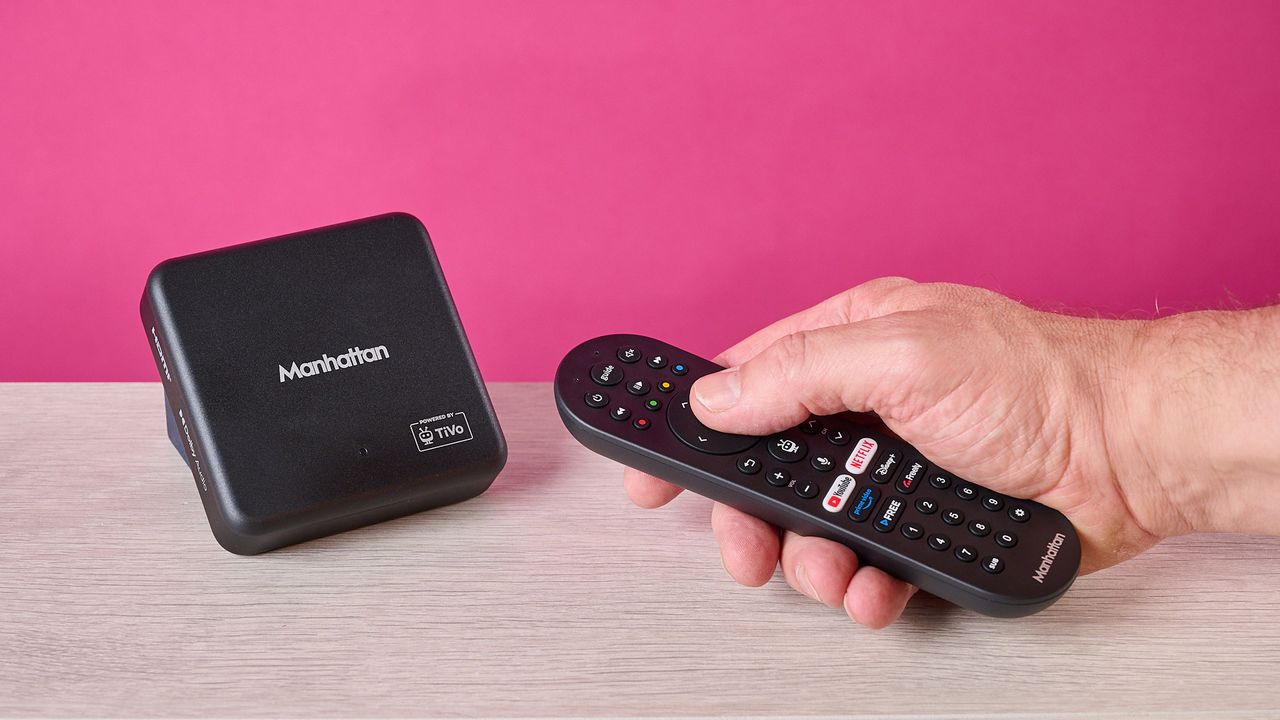
The Manhattan Aero is a small streaming box packed with just about all of the essentials for UK viewers — more than 450 channels via Freely, as well as Netflix, Prime Video and all that good stuff. All you need is a Wi-Fi connection and a TV, and you're good to go. But is it actually worth buying? Here are my thoughts after a few days testing it out for myself.
Let me start by saying that the initial setup process for the Aero is extremely simple and speedy. Just hook the device up to your TVs HDMI port, plug it into the power, and you’ll be able to get started. From here, I followed some basic setup instructions, connected the box up to my network, and landed right on the home page.
Navigating through various menus is also incredibly easy with the included remote, which — in spite of a fairly plasticky and basic build — is responsive and effective in use. It comes with all the expected buttons, as well as shortcuts to certain streaming apps, and a voice control option too.
Voice controls are very intuitive on TiVo OS (which is what the Aero uses), and if you want some inspiration for what to watch, it’s a great tool. For instance, I tried saying: ‘show me films about cats’ and got an accurate selection of feline-related flicks.
Let’s loop back to the Manhattan Aero’s OS, though, and discuss TiVo for a minute. I’ve used this before on TVs like the Bush 43UT24SB, and I’m a fan. It’s pretty similar to a lot of the competition, and you can quickly find whatever channel or app you need without a hitch. Loading varying apps and channels is quick, and you can easily customize what apps you want to see on the homepage in the settings menu.
Speaking of apps, it’s worth noting that some of the heavy hitters are actually missing on TiVo. For instance, Apple TV+, Paramount+, NOW TV and Sky Go are all absent. These apps are available via devices like the Apple TV 4K set-top box, though.
Sign up for breaking news, reviews, opinion, top tech deals, and more.
Anyway, you may be wondering by now: how does the Manhattan Aero perform? Pretty well, actually — although you’ll need broadband speeds of at least 10Mbps to enjoy live TV and streaming at their best (Ethernet connectivity is available if needed). When watching broadcast TV, the Aero did a great job with all kinds of content. For instance, I watched a bit of Wimbledon, and the vivid green of the court jumped out, while finer details on players’ clothing were easy to make out.
News and the usual daytime TV channels also looked just about as good as on my Sky Glass Gen 2 TV, which uses Wi-Fi to show its channels too, rather than a dish or aerial. It’s also worth noting that the Aero supports HLG HDR, as used by BBC iPlayer.
With streaming apps, the Aero remains a strong performer, but there are a couple of sacrifices you’ll have to make. Namely, there’s no Dolby Vision support — no problem for Samsung TV owners, but something I would’ve liked to have seen, since pretty much all other TV brands use it.
There is, however, HDR10+ (and HDR10) compatibility, which is used on services such as Netflix and Prime Video — and the Aero supports AV1 natively for HDR10+ content, which is necessary for Netflix to work in this format. When watching Kung Fu Panda 4 in HDR10+, I thought it looked fantastic — colours looked punchy and accurate, textures were well-defined and sharp, and contrast was solid too.
I did experience a bit of judder while watching the movie, and motion appeared to be choppy at first. But after messing around with my TVs settings and activating the Aero’s Auto Frame Rate option, I was able to solve this, and experience the sort of quality I’d typically expect from Netflix and other streaming apps when built into the set.
When it comes to audio, there’s basic Dolby Audio support, and you can also enjoy Dolby Atmos content if you have a compatible soundbar or speaker system or similar connected up to your TV. You can also use one of the box’s USB-C ports to play stored media files, which is a welcome inclusion and not you'll find on much of the competition.
One question I’ve seen a few people ask about the Aero, is whether it can record TV programs — like you’d be able to do with a Sky Q box, for instance. The answer to this one is no — but that’s not a strike against Manhattan’s streaming box. And that comes down to one key thing: Freely is delivered as an internet stream rather than a broadcast signal, and broadcasters don’t allow such content to be recorded. It’s still worth bearing in mind, however, if recording is a must for you.
Before we wrap up, there are a few other things worth noting. There’s CEC volume control on offer here, which enables you to control the volume of your connected display and audio devices (like soundbars) using the Aero's remote with any extra setup needed, something that is pretty practical.
You can also connect Bluetooth devices, such as headphones, to the Aero, which is great if you don’t want to distract someone else while watching your favorite shows, if your TV doesn't support this option.
You can even connect wireless game controllers and play a few mobile style games — a feature I didn’t expect to see. In fact, Blacknut Cloud Gaming is arriving to the Aero shortly, giving gamers more options. Google Cast is also available if you want to beam content across from your phone.
So, is the Manhattan Aero worth the money? At £89.99, I think it is. There are cheaper options out there, such as the Roku streaming sticks, which can also plug into your TV’s USB port for a more discreet look, but these don’t offer Freely — the big selling point of the Aero.
Alongside its intuitive TiVo platform with handy voice commands, solid array of apps, and impressive picture quality, I’d argue that the Aero offers plenty for the price you pay, and if you have a TV devoid of smart apps or want access to loads of channels without the hassle of an aerial or dish, it’s a very practical device.
Manhattan Aero review: price & release date
Released in February 2026
Priced at £89.99
The Manhattan Aero released in February 2026 and is available with a wide range of UK retailers. However, there’s no stock available at Amazon right now — this may change in the future, though, so we’ll update this article accordingly if we see an increase in availability.
The streamer is priced fairly affordably, coming in at £89.99 — that's much less than the Apple TV 4K, though is more than the likes of the Amazon Fire TV Stick 4K Max.
Should I buy the Manhattan Aero?
Swipe to scroll horizontally
Attribute
Notes
Score
Features
Intuitive software and voice control, good connectivity options, Freely and smart apps with 4K picture quality — but some apps are missing.
4 / 5
Performance
Very good picture quality with HDR10+ and HLG support, and Dolby Atmos passthrough support for immersive audio. No Dolby Vision is a shame, though.
4.5 / 5
Design
Fairly compact and sleek, remote not the best quality but very responsive.
4 / 5
Value
Not the cheapest, but the inclusion of Freely and solid app line-up helps it earn its price.
4 / 5
Don’t buy it if…
Manhattan Aero review: also consider
How I tested the Manhattan Aero
Connected to my Hisense 4K mini-LED TV
I watched broadcast TV as well as content on streaming services
Used across multiple days at home in everyday life
I spent a few days testing the Manhattan Aero streamer, testing it out at home to enjoy live TV and content via my usual streaming apps. I had it hooked up to a HDMI port on my Hisense U7K TV, which is a 4K mini-LED set.
During the testing period, I made sure to cycle through various channels when watching broadcast TV in order to assess performance for sports, news, movies, and more. However, I also dipped into apps like Netflix, where I watched content in 4K HDR10+, as well as Disney+ and YouTube.
More generally, I’ve spent years testing all kinds of gadgets here at TechRadar, including everything from Dolby Atmos soundbars like the JBL Bar 1300MK2 through to TVs like the Sky Glass Gen 2. I was also familiar with the TiVo interface before commencing this review, having used it extensively while testing the Bush 43UT24SB.
Read TechRadar’s reviews guarantee
First reviewed: July 2026
Harry is a Senior Reviews Writer for TechRadar. He reviews everything from party speakers to wall chargers and has a particular interest in the worlds of audio and gaming. Harry has a background in business tech journalism, particularly around the telecoms industry.
View original source — TechRadar ↗
Related stories
ABC News
TechnologyJul 13, 2026 · 1 min
'Gatekeeping septuagenarians': 'Inappropriate' TikTok video deleted
ABC News

TechRadar
TechnologyJul 13, 2026 · 1 min
Space Force has a new weapon to target enemy satellites
TechRadar

Mexico News Daily
TechnologyJul 13, 2026 · 1 min
10,000+ arrests, 50,000 guns seized: US ambassador touts anti-cartel firearms push
Mexico News Daily

TechCrunch
TechnologyJul 13, 2026 · 1 min
Apple says former employee exploited ‘rare’ bug to download confidential files after leaving for OpenAI
TechCrunch