TechRadar
Viaim OpenNote review: I wore this open-ear voice recorder all day, and its AI meeting summaries proved invaluable
AI transcription headphones with an open design that delivers clear audio for calls and music while still letting you hear what's going on around you. Like most modern earphones, they can be used for music and making calls, but it's the real-time transcription and meeting summaries that make them stand out, with transcription available for 78 languages, auto summaries, and action points to make you more productive. Hooking the OpenNote earphones over my ears, the speaker section fell neatly over the opening of my ear. Audio for music was ok, but lacked the bass depth I’m used to with in-ear or cans; however, I could still make out the ambient noise and conversations around me, making these far more sociable and work-oriented than standard earphones. Beyond music, the transcription and summary tools through the app do their work, providing clear notes and action points. Music isn’t the core; however, productivity is, and for that use in the workplace, these earphones excel.
Pros
+Accurate transcription
+Open-ear design
+Long battery life
Cons
-Limited bass
-limited free transcription
Why you can trust TechRadar
We spend hours testing every product or service we review, so you can be sure you're buying the best. Find out more about how we test.
Viaim OpenNote: 30-second review
I’ve looked at a fair few of these AI note takers in recent months, and they’re getting progressively more impressive. The Viaim OpenNote takes a slightly different approach to some, like the superb Plaud Note, as in the hardware is designed as a pair of open-ear earphones, essentially the type that hook over your ear with the small speaker unit resting just outside the ear canal, and like so many other earphones of this design, they enable music playback and enable you to make calls.
However, music and calls are only part of the story; they also offer internal recording, making them an ideal option for work and meetings. When you enter the office, simply squeeze the speaker section, and it starts capturing whatever's being said. Once the meeting has finished, the audio can then be sent to the app, where it’s then transcribed and summarised. Unlike some rivals, the recording is activated and stored in the earphones, so no need to use your phone to capture.
In meetings, wearing a set of earphones may well look a bit rude, until you explain, and here’s where the open design really comes into play. As the earphones don’t go into your ear, you can hear everything around you as if the earphones weren’t in. So, throughout the test, I was able to attend meetings, record the session, and afterwards download the transcription for use as key points and action points, and even visualise it using a mind map. In meetings, I found that through the app the “Live Recording” option meant that I could actually take them out of my ear and just leave them on the desk to the same effect.
Where they really came in use was through phone calls, again enabling them to record calls through the App and then deliver the prepared summaries of what had been said and what was needed.
For work, these earphones are exceptional, and I liked that I could work, listen to music and podcasts, talk to people without needing to remove them, and record conversations with a quick squeeze. It all became very second nature with the summaries becoming invaluable. If you love your music, the lack of insulation and isolation in the design will be a bit of a let-down, but for their core use as work-focused, AI-enhanced earphones, they’re impressive.
Viaim OpenNote: Price and availability
How much does it cost? From $169
When is it out? Available now
Where can you get it? Directly from Viam and online retailers
The Viaim OpenNote is priced at $169.99 in the US and is available in black or white directly from the Viaim store.
It's also listed for $221 on Amazon.com, as well as sites like Newegg and Target. A confirmed UK price is still to be announced at the time of writing.
Sign up to the TechRadar Pro newsletter to get all the top news, opinion, features and guidance your business needs to succeed!
Advanced AI models are available from $9.99 a month / $79.99 a year
Value: 4 / 5
Viaim OpenNote: Specs
Type: Open-ear wireless earphones
Connectivity: Bluetooth 5.3, dual-device connection
Codecs: SBC, AAC, device-dependent LHDC
Drivers: high-polymer racetrack-shaped dynamic drivers
Microphones: four, with call noise reduction
Battery: 115mAh per earbud / 750mAh case; 19 hours (earphones) / 53 hours (total with case)
Fast charge: 3 hours from a 10-minute charge
Weight: 10.5g per earbud / 55.5g charging case
Frame: 0.8mm titanium memory wire, silicone contact surfaces
Water resistance: IP55
Software: iOS and Android app, plus web platform
In the box: earphones, charging case, USB-C cable, quick-start guide
Warranty: 12 months
Price: $169.99 (UK price TBC)
Viaim OpenNote: Design
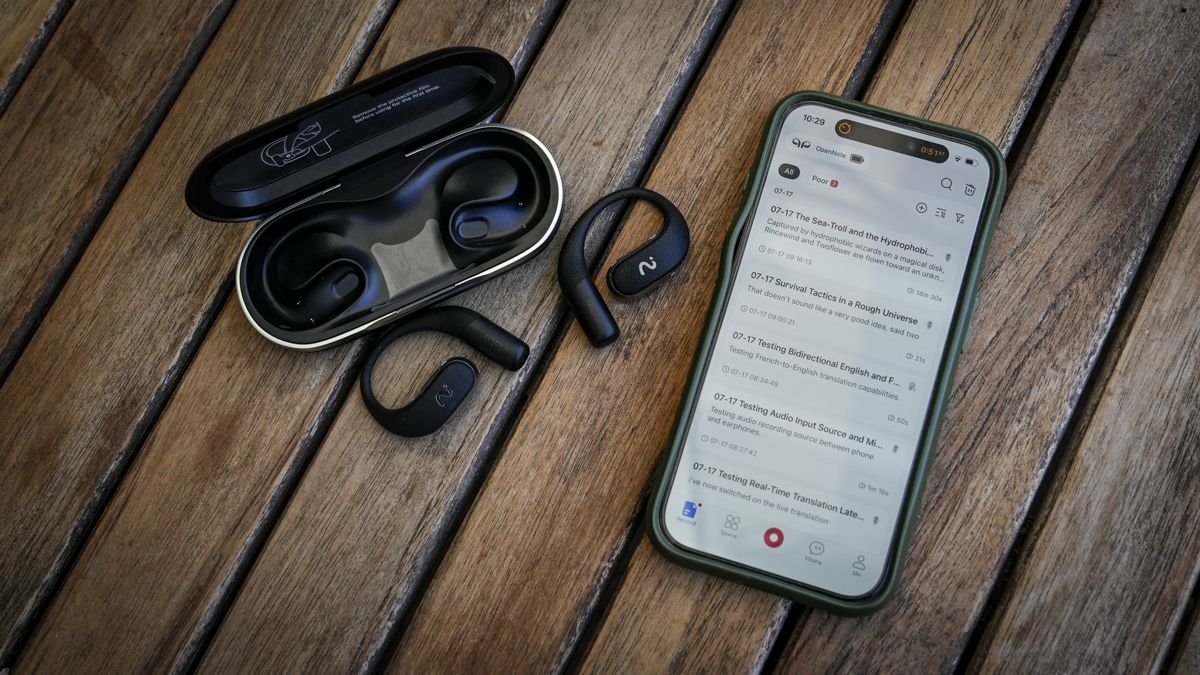
A first look at the OpenNote package, and it would be easy to mistake these for a standard set of over-the-ear open earphones, rather than an advanced set of AI-enhanced note-taking earphones. The design differs from other over-the-ear earphones in that the small speaker unit rests just by the opening of your ear canal rather than sitting in it, which means there’s no airtight seal, so no boost in base or isolation from the world beyond the audio that you’re listening to.
The OpenNote, on the other hand, will play music and podcasts perfectly well, though if you are an audiophile, the depth of tone will disappoint. However, these are for work, not play. Listen to music and podcasts by all means, but the OpenNote design means that if someone talks to you, you’ll hear it instantly. Just turn the volume down, if needed, and chat. They essentially give you a personal version of listening to traditional radio while still allowing you to carry on conversations.
However, the design, available in black or white, simply hooks over your ear, and a 0.8mm flexible titanium wire lets you wrap each in place securely. The slender design and flexibility meant that, even though I wear glasses, the earphones sat neatly alongside the arms of the glasses.
The earphones are also compact, each weighing 10.5g, which is light, and, thanks to the design, even when hooked over the ear, they didn’t put any noticeable pressure on my ear and were surprisingly comfortable to wear all day.
Inside is a small battery that lasts a reported 19 hours between charges, and the charging case, which weighs 55g, can give the buds a boost, enabling 3 hours of use from a 10-minute charge and up to 53 hours in total.
Checking over the earphones and case, it all seems solid enough, with the case featuring a single USB-C port for charging, and the earphones sitting inside to store and charge.
The buds also offer IP55 protection, which should stop dust, sweat and light rain, so they’ll survive most conditions, just don’t go swimming in them.
Beyond being used as wireless headphones, the recording and playback features are all activated by a pinch, while the transcription features require the app to work.
Design: 4.5 / 5
Viaim OpenNote: Features
As with all of these devices, Viam has come up with its own feature names for many of the earphones' functions, with the main one being FlashRecord. This is essentially the feature the earphones are designed around, and it enables you to record directly onto the earphones without needing to control them with your mobile phone. This means you can be fast and responsive when you need to take notes, without fumbling around for a phone, dictaphone or notepad, depending on how you work.
Once the recording has been captured, you can connect to the App, download it, and transcribe it. What’s impressive here is that if you’re on a call, you can get real-time transcription in 78 languages and, apparently, 145 regional accents. Once the text transcription is complete, you can get it delivered as a key, an action point, notes, or mind maps, among several templates. This in itself is nothing new, but nonetheless, it is incredibly useful, and if you need to, you can share that transcript live with a colleague.
What I like about the companion app's feature set is that once you’ve finished recording, you can automatically have it transcribed in real time. A difference between this and many other AI Note hardware options is that 600 minutes of transcription are included per month for free, which is far more than most other options.
In addition to transcribing the audio you’ve recorded, the app can also transcribe existing recordings and, again, apply templates to the way that information was supplied.
When it comes to connectivity technology, the earphones utilise Bluetooth 5.3 with dual-device pairing and support for SBC, AAC, and device-dependent LHDC codecs. To ensure excellent audio pickup, there are four microphones with electronic call-noise reduction for voice calls, although it’s worth pointing out that this is very different to the sealed-ear active noise cancellation you’ll be used to with standard in-ear options.
One of the big issues with many AI transcription hardware is that there is always a subscription model attached, and that’s true here as well, with a free allowance of 600 transcription minutes a month; anything beyond that goes onto the paid models and again if you want to upgrade the AI model.
Features: 4 / 5
Viaim OpenNote: Performance
After a quick charge to 100%, I downloaded the APP, which, in the literature, is referred to as OpenNote; however, searching for that in the Apple Store just returned a variety of unrelated apps, and eventually typing in Viaim brought up the correct option. Once downloaded and connected via Bluetooth, the home screen appears. To connect, click the add device button at the top. After a quick scan, it’s set and ready to go.
The home screen shows a variety of sample recordings to give you a flavour of what's possible, then you can make your own through the app interface or transcribe existing recordings. To make a recording through the App, you hit the red record button at the bottom-centre of the screen. On the first push, it pops up asking for a few more details about you, what job type and position, this is to fine-tune the experience, but it feels a little invasive.
After that, each time you hit record, you can access different recording types: Call Recording for phone calls; Audio and video recording for real-time transcription; Live recording for meetings; and Live Translation and Recording if you need translation. I opted for English-to-French in this test.
I’ll run through these options first, as they offer more advanced transcription options. In all cases, the quality and accuracy of the transcription from the recordings were good; however, not quite 100%. With some words, such as card constantly being captured as Cart and earbud as Earbi, aside from small word errors, the action reliability overall was good. What I liked about the system was the ease of switching between recording types, all done through the app, with the earbud mics picking up the audio.
Having tested Ai earphone options in the past, the accuracy here with the dedicated hardware is a step up, though still not quite 100%. The live recording, where you can essentially pop the earphones down on the table during a meeting rather than wearing them, worked incredibly well, and the transcription started as the conversation began. What I liked here is that it can identify the speakers although not in realtime. It does this after the meeting: as you look at the transcription, click the “Speaker diarization” button, select the number of speakers, and the App identifies and labels accordingly. Again, this worked well, and best of all, this is included in the free plan.
Through this test the AI model that the App used was GPT 5.4 Nano, although there are other options including Gemini 3 Flash, Claude Haiku 4.5 which are all free options and then GPT 5.4, Gemini 3.1 Pro and Claude Sonnet 4.5 all incur a charge of £9.99 a month or £79.99, however, those slight miss transcriptions of the free models do take a sudden uplift on the paid for versions.
The live translation is also handy, although not quite as smooth as dedicated AI translation options. You choose the main language, in my case English, and as I speak, it translates into French. However, when someone answers in French, you then need to switch the main language to French and the translation language to English. It all works well, but it isn’t an easy switch, and it would have been good, at least, to have a speaker 1 main language and speaker 2 main language so you could quickly flip between the two.
At present, this is all about the app and not the hardware, although the small mics play their part throughout.
Popping the earphones in, they fit extremely well, with the speaker units resting at the openings of my ear canals. The first step before checking out the recording functions was to listen to some music, and in this user scenario, they work much like any other headphone connecting to whatever app you use and playing the music.
It’s instantly apparent that listening to music or podcasts isn’t the intended primary use, more through the open design than audio quality. As the speaker unit rests in front of your ear canal rather than in it, there’s no seal, so the audio lacks the depth I’ve come to associate with in-ear. However, in the office, listening to a bit of music, you can hear the content perfectly well, and everything else that’s going on around you. And if someone wants to talk to you or shout to you across the office, the earphones don’t muffle the sound; it’s a far more sociable solution for the office environment than standard headphones. In fact, it's more like listening to a traditional radio in that respect; you can have the audio in the background.
To record a conversation, simply squeeze the main section of the bud for 3 seconds. You'll hear a confirmation sound, and then you know the earphones are recording. When the conversation stops, another squeeze ends the recording.
In the App options, there is the FlashRecord option. If this is selected, the track is automatically downloaded to the phone once the recording ends, ready for transcription. At this point, you need to go to the app, click Transcribe, and then you’ll get the summary, transcription, and mind map. There are additional options here as well, with the transcription process taking around a minute for most short conversations and longer as the length of those conversations increases. That process takes around a minute to download a 15-minute recording from the earphones to the iPhone 15 Pro and a further 42 seconds to transcribe and generate the summaries.
While most of the options are straightforward, the workflow sometimes requires an additional step, and you can’t help but feel that an auto-switch would be a good idea. When taking calls, for instance, you need to select the call option from the App when recording. While a quick pinch will answer a call, it doesn’t automatically start recording; you need to select that from the app.
However, there’s no getting around how useful the summaries are and the ability to share the transcripts afterwards. Through the test, I used the headphones for a couple of weeks, with them being active through-out the day, playing music or recording from 7:30am through to 7pm in the evening and then being put on to charge overnight.
Through that time, I recorded several conversations and phone calls. While the recording process wasn’t at first that natural, it felt like something that would come with time, and ultimately, aside from letting people know that you were about to record, it fitted in well with day-to-day working life, and there was absolutely no doubt that the transcriptions and summaries were extremely useful.
Performance: 4.5 / 5
Viaim OpenNote: Final verdict
These earphones work on several levels, from listening to music and podcasts, to recording and transcribing meetings, conversations and calls, to being the perfect option for busy working environments where traditional earphones can be unsociable due to the isolation.
On the first point, listening to music, think of it as a background radio, you can get good volume if you need it, but at the same time keep the volume low, and you can hear everything around you , even have conversations without removing them. To the last point, this means that if someone needs to get your attention from the other side of the office, they can. You may not get the audio depth of in-ear or cans, but in a working environment, these are probably a better option.
Then there's the app functionality, which gives you access to the advanced features and different language models. During the test, I used GPT 5.4 nano, which worked well but occasionally omitted a few words or replaced them with close-but-not-quite-right alternatives. However, the summaries and the usefulness of what it could do, all on the free tier, were exceptional. If you take the step up to one of the newer, more advanced models, the price starts to climb, but the quality of the transcription improves.
Away from the app and the simple squeeze to record gesture makes them easy to operate, and if you’re around the office, then this works incredibly well, and I even could in meetings with the earphones on the desk, even without switching to the Live mode in the app, the earphones were still able to pick up what was said with ease.
At the end of the test, the usefulness for work is readily apparent: you can document your day through snippets of transcribed audio, which are then turned into useful formats that enable summaries and action points. I do wish there were a little more automation and that call recording could be activated from the headphones, but still, there’s a lot on offer here.
Should I buy a Viaim OpenNote?
Swipe to scroll horizontally
Value
Excellent value for money, especially with the free 600 minutes of monthly transcription
4/5
Design
Surprisingly comfortable to wear and easily fits around glasses if needed
4/5
Features
A little more automation through the modes would be good, but a solid set of features
4.5/5
Performance
Even on the free tier, the transcription quality is good, boosted as soon as you pay for a subscription to a more advanced model
4/5
Overall
Great option for busy professionals who need to take notes from conversations, meetings, and calls.
4/5
Buy it if...
Don't buy it if...
For more note-taking tools, we reviewed the best speech-to-text apps around.
Alastair is a photographer, filmmaker and tech writer who has been working in the publishing industry since the late 1990s. For more than 25 years he has covered photography, video and technology across Future's photography, technology and gaming brands. He runs a photography and video production company and lectures in TV and film. He can usually be found testing mini PCs or prototyping and prop building with the aid of 3D printing.
View original source — TechRadar ↗
Related stories

Nepali Telecom
TechnologyJul 17, 2026 · 1 min
Ncell launches Shake and Win with Suprise Rewards
Nepali Telecom
ZDNet
TechnologyJul 17, 2026 · 1 min
5 underrated iOS 27 features that make my iPhone way better - and none are Siri AI
ZDNet

The Verge
TechnologyJul 17, 2026 · 1 min
Bethesda teases Fallout 5 soon after Xbox’s mass layoffs
The Verge

The Verge
TechnologyJul 17, 2026 · 1 min
The manosphere’s testosterone fever is coming for the troops
The Verge