Engadget
Oppo Watch X3 review: Come for the battery, stay for the versatility
A more robust smartwatch than its Wear OS rivals.
Daniel Cooper for Engadget
RATING : 8.2 / 10
A lot of companies are happy to shrug off concerns about battery life in favor of aesthetics and vibes. Not Oppo, which equipped the Watch X3 with a cell nearly twice as big as the one found in Samsung's Galaxy Watch 8. But a long life is nothing if you can't enjoy things along the way, and it's here that the X3 comes into its own as one of the best Wear OS 6 devices going. It's got a few flaws, and I'm not entirely sold on its fitness tracking bona fides, but I'd happily use it as my daily driver.
Hardware
Daniel Cooper for Engadget
Let's address the elephant in the room: The X3 is awfully similar to last year's OnePlus Watch 3. Now, look, I don't want to point my accusin' finger here, but you could get the impression it's the same watch, rebadged. After all, Oppo and OnePlus share an owner, and the rumor is the latter is being pulled out of western markets in favor of the former.
Both watches have a 1.5-inch 466 x 466 LTPO AMOLED display, 2GB RAM and 32GB storage. Both have the same dual-processor setup, pairing Snapdragon's W5 with a custom BES2800BP for the low-power stuff. Hell, even the battery life claims are the same: between three and five days of full use, and up to 16 when the watch is in power-saving mode.
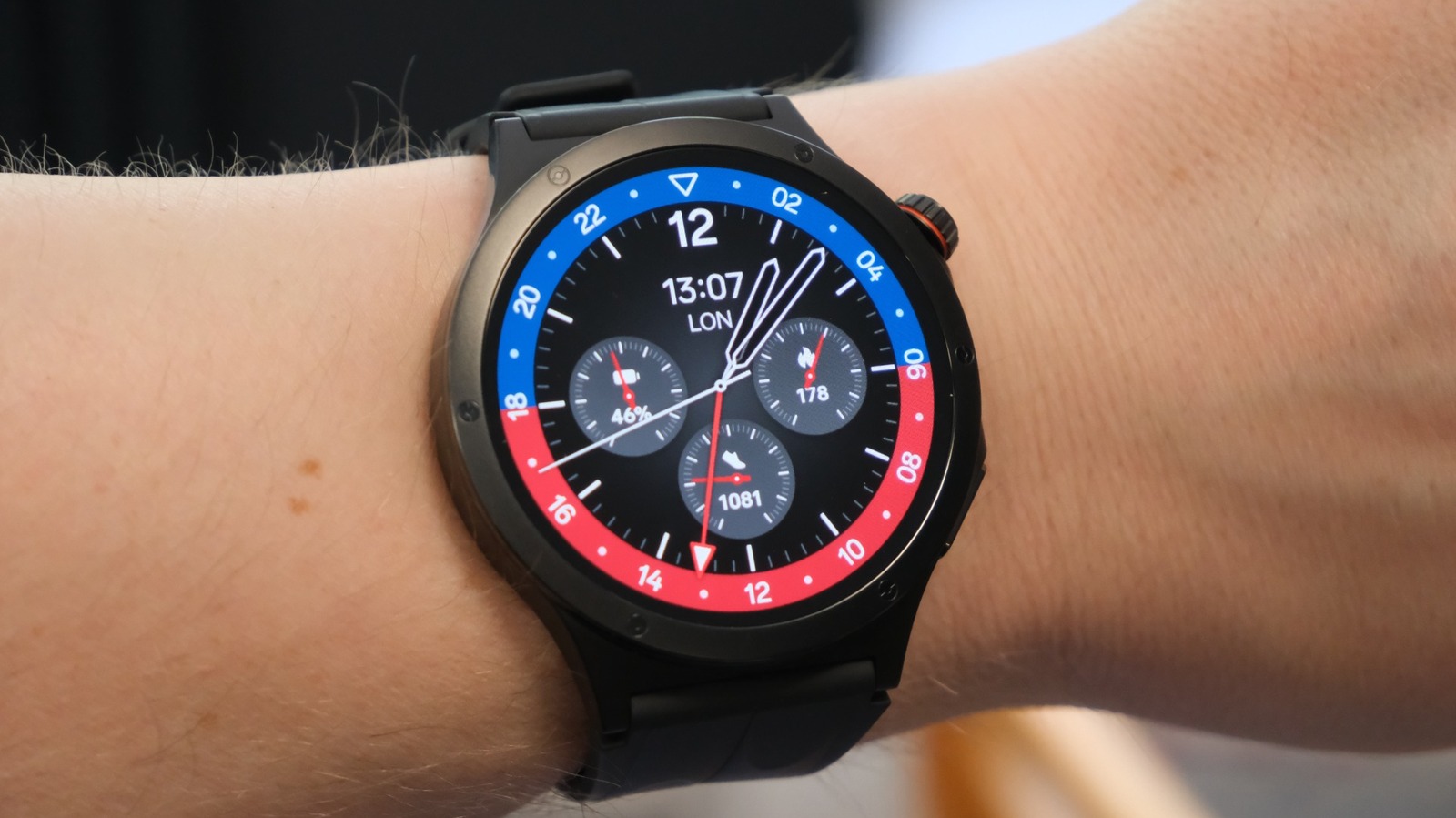
They look the same, too: identical 47mm titanium cases, right shoulder mounted crowns and the action button on the lower third. One difference is that OnePlus went for a diver's chronograph for the bezel, while Oppo went for faux rivets. It makes the X3 look more like a Garmin and, by extension, makes the wearer look a lot more like a Garmin Person.
I prefer watches which tend toward the classier side of things, but I like Oppo's styling here. It bridges the gap between a hardcore fitness watch and the geekier side of Wear OS nicely. To the point where it's almost — almost — possible to shrug off the declassé vibes that come from wearing a watch with such a substantial touchscreen.
In-use
Daniel Cooper for Engadget
Oppo sold the X3 on the basis of its slim and light design, premium materials and durability. So, rather than babying the unit, I set to work getting as rough and tumble with it as I could, and I haven't been disappointed. After two weeks of almost intentionally neglectful use, I haven't found a single dent, scratch or chip on the case or crystal. In fact, I'm deeply impressed by how well it's managed to take the sorts of activities most people would leave their watch at home for.
The X3 deserves even louder praise for its battery, which is so good it'll make the Pixel, Galaxy and Apple Watches faint in intimidation. It's equipped with a 646mAh battery with 10 percent silicon content, far in excess of what you find from its fancier rivals. With the always-on display set to run from 8am to 9pm, I can get about three days of fairly intensive use on a charge. With the screen only set to wake when I raised my wrist, that endurance leapt closer to five days.
I'm also a fan of the snappy performance, and I'm not sure I noticed any sort of lag or delay when switching between apps. And while I would still only ever use such a feature in dire circumstances normally, it was fun to respond to messages with my voice.
It's not been all perfect: The first night I wore the watch, I forgot to activate sleep mode and so was rudely awoken by it vibrating at me at 5am to wish me a good morning. A few times, the watch face has suddenly changed to a different one without me intentionally doing something. And while it's possible to make small tweaks to the watch faces, I wish they were far more customizable. For instance, the chronograph face known as Twin Time has three subdials, but you can't assign what data points they show. The end result is that all of the faces are too cluttered or too sparse, neither of which is preferable.
Some of my gripes are more with Wear OS in general than Oppo in specific, like the shameless stat padding in the app menu. In my book, it would be cleaner to have one button to access all of the tools related to a specific function. Instead, you get a constellation of shortcuts that makes the watch's functionality look impressive but it's a usability nightmare. There are three icons for the stopwatch, alarm and timer that could just as easily be within the same pane to make getting around the main app menu far easier.
I found the X3's Bluetooth pairing to be a little erratic, too, with it ignoring a few of my older pairs of wireless headphones. Once I found a pair that it did work with, however, it was plain sailing to get it paired and up and running.
Inevitably, I must talk about Gemini — long press the crown and you'll be able to engage with Google's AI. I did find the X3's built-in speaker to be a little tinny, and you'll hear clipping and fuzz if you turn the volume up enough to be able to hear what it's saying. One upside is the built-in Wi-Fi, which meant I could still access Gemini (to set timers for making dinner) even though my phone was turned off and recharging at the far end of the house.
I suppose, too, I should make mention of another special feature the X3 offers, which is short video control. Specifically, if you're watching TikTok and YouTube shorts (only), you can select an app that'll put four-way controls on your watch face. This is, presumably, for those times when you don't want to scroll TikTok one-handed, like a normal person, but two handed with your phone at some distance from you, but not so far enough as to warrant using some other control. But hey, I don't need to understand why anyone made this feature, I just have to tell you that it works.
Fitness tracking and health
When it comes to fitness tracking, the story of the X3 is a tale of two watches: Its automatic workout detection is either annoyingly perfect or utterly useless. I walked to a doctor's appointment and the tracking kicked in shortly after I started, retroactively added in the first few steps and was glorious. Alas, when I stopped at a crosswalk, it started vibrating to let me know it had paused the tracking, vibrating with equal urgency when I started walking again.
By comparison, I spent a fairly grueling eight hours digging out meters of soil and rock by hand one Saturday. What did the watch detect from my effort? Nothing. It knew my heart rate was elevated, I'd burned twice my usual calories and been far more active than normal. But that data wasn't enough to trigger any sort of query or prompt to ask what I was doing and I got no insight after the fact.
As for the health tracking, as usual I'd advise that nobody should be looking at the data too closely, instead monitoring the trends. And, compared to the data coming off the Oura and Ultrahuman rings I'm wearing, the X3's conclusions aren't quite in the same neighborhood. Oppo thinks I slept for longer, had a far faster resting heart rate, and a far greater maximum and minimum heart rate compared to the other wearables on my person.
Wrap-up
Daniel Cooper for Engadget
If there's a wrinkle, it's that the Watch X3 isn't available to buy in the US unless you hunt for an importer. That will, inevitably, mean owning one is more of a punt than it would be if you were buying it outside the US, where Oppo sells its devices itself. That's going to be a dealbreaker for plenty, and I get why, but it's also a big shame because it's a worthy competitor to Google and Samsung.
View original source — Engadget ↗
Related stories

TechRadar
TechnologyJul 13, 2026 · 1 min
The Westies stars J.K. Simmons and Tom Brittney clap back at fan complaints that new MGM+ mob crime thriller is 'too…
TechRadar

TechRadar
TechnologyJul 13, 2026 · 1 min
What is the release date for X-Men 97 season 2 episode 5 on Disney+?
TechRadar

Philippine Daily Inquirer
TechnologyJul 13, 2026 · 1 min
Baguio begins dry run of P10-M smart traffic signals to ease gridlocks
Philippine Daily Inquirer

France 24
TechnologyJul 13, 2026 · 1 min
Iran launches drone, missile attacks on dissident bases in Iraqi Kurdistan
France 24